
This would indeed be annoying. Fortunately, it’s pretty easy to fix this problem, if your configuration is what I think it is with Yahoo Messenger.
Start up the application, it’ll look like this:

Now, click on the Preferences option in the Messenger menu along the top:

and you’ll be take to Preferences for the application. The second of the options is “Alerts & Sounds” and that’s what you want to check. Here’s how I have mine set:
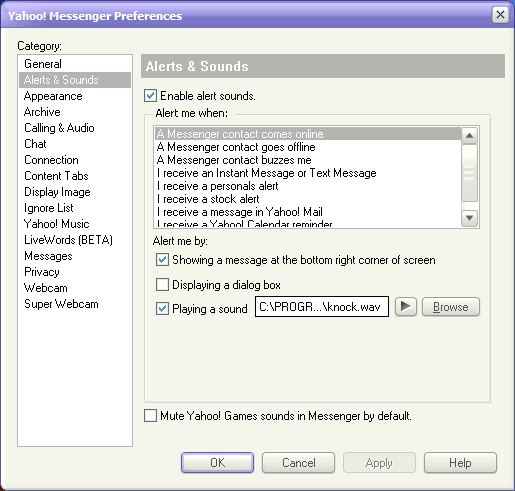
The key is to ensure that you have “Enable alert sounds” and/or “Showing a message at the bottom right corner of the screen” (or both). If you have both set, then I suspect that your buddy list is messed up and/or your preferences are messed up. In that case, you might try uninstalling the application then reinstalling it again.
Good luck!


10 thoughts on “Missing audio alerts in Yahoo Messenger?”
AUDIO CONFERENCE PROBLEMS
-I’m hearing my voice in speakers but delay (I’m suggesting if it is possible to out it to output card directly and also to internet without looping or coming back to me again)
problem occur during opening
this is problem with my yahoomessenger when i signout my friend called and told me that am still online.
the second one is this when am online i will chat with some people on my messenger list they would not see what am typing and i would not see what they are typing too
i am using yahoo messenger with video chat,tex messeging and the problem is ,there is no audio while i’m chating with my wife in the philippines!please assist me in this poblem with the yahoo.messenger!
I have already done everything that you suggest. Still, I do not have alerts & sounds for my email through messenger.
My email alerts & sounds are enabled. However they do not work. I have even uninstalled Yahoo messenger and reinstalled it and the problem still continues. How do I get the alerts & sounds to work?
how can i sign in my high school when i cant what other website can i use or something to log in
I too had missing sounds from Messenger 8 and followed this link to put them back in:
http://help.yahoo.com/l/us/yahoo/messenger/messenger8/messenger/messenger-38.html
My messenger today suddenly stopped giving me alerts when I receive Email. Other alerts still work. Do you have any suggestions?
the above option didn’t work out for me…. as it is default and the sound alerts are enabled but i dont get any sound alert…, i don’t think there is any problem with the sound driver cuz rest of all the software works fine