Ask Dave Taylor
  • Facebook
  • Instagram
  • Linkedin
  • Pinterest
  • Twitter
  • YouTube
  • Home
  • YouTube Channel
  • Most Popular
  • Newsletter!
  • Ask Me A Question
  • Meet Dave
  • Home
  • iPhone & iOS Help
  • Update your Route and Transit Preferences in Apple Maps

Update your Route and Transit Preferences in Apple Maps

July 24, 2023 / Dave Taylor / iPhone & iOS Help / No Comments

Dave, I use Apple Maps for both driving and biking routes and directions and am wondering if I can have it avoid toll roads or even busy roads and hills when on my bike?

  ★ ASKDAVETAYLOR WEEKLY EMAIL! ★
Guaranteed to Make you Smarter.
Click Here to Subscribe.

Apple has been diligently working on its Maps software and system for many years an it’s pretty darn slick nowadays. Yes, when first released, it had some issues, including a tendency to route you along one way roads and through private areas, but that’s all the in past, and its routes – and traffic info – are on par with the very best mapping systems online.

This isn’t to say that it’s not smart to occasionally go into the preferences and settings area to ensure that it’s calculating routes that match your own preferences in this regard! Confusingly, these settings appear in different places and don’t seem to sync across devices, so if you calculate routes on your Mac with Maps, then send that to your iPhone, you might well have an issue. Let’s look closer…

APPLE MAPS FOR IPHONE: SETTINGS

Go into Apple Maps on your iPhone and you’ll see something like this:
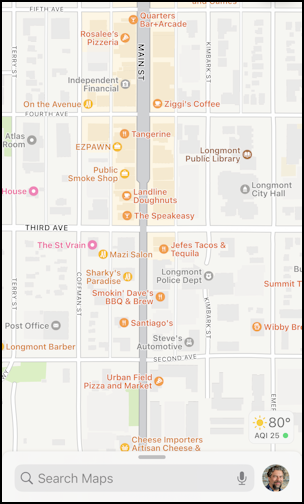
apple maps routing direction preferences settings - basic map view

You’ve undoubtedly seen this view a thousand times. But have you ever tapped on your profile picture? That brings up a menu of key features and tools:
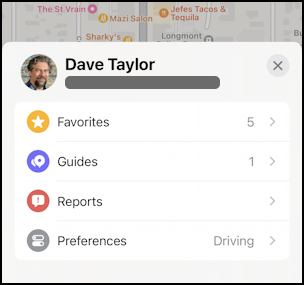
apple maps routing direction preferences settings - menu

Choose “Preferences” to proceed…

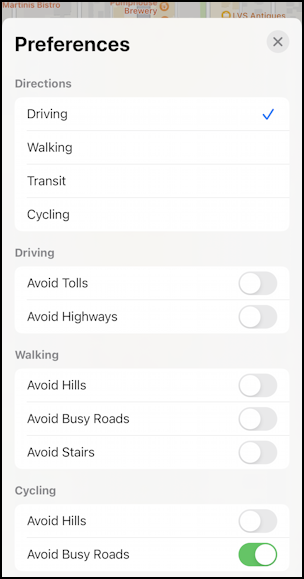
apple maps routing direction preferences settings - app preferences

This set of options probably covers most of what people want to tweak about their directions through Apple Maps, and it’s pretty cool that you can say “Avoid Stairs” with walking directions too. While you’re on this screen, swipe up, because there are more settings and preferences too.

IPHONE SETTINGS > MAPS

Interestingly, there are different settings if you go into the Settings app and check out what’s shown for the Maps program:

apple maps routing direction preferences settings - more app prefs

Between these two sets of preferences, you should be able to get your iPhone app to work as desired. But what about on your Mac?

APPLE MAP SETTINGS IN MACOS

On the Mac, it’s easier to get to the settings: Launch Maps and go to Preferences:
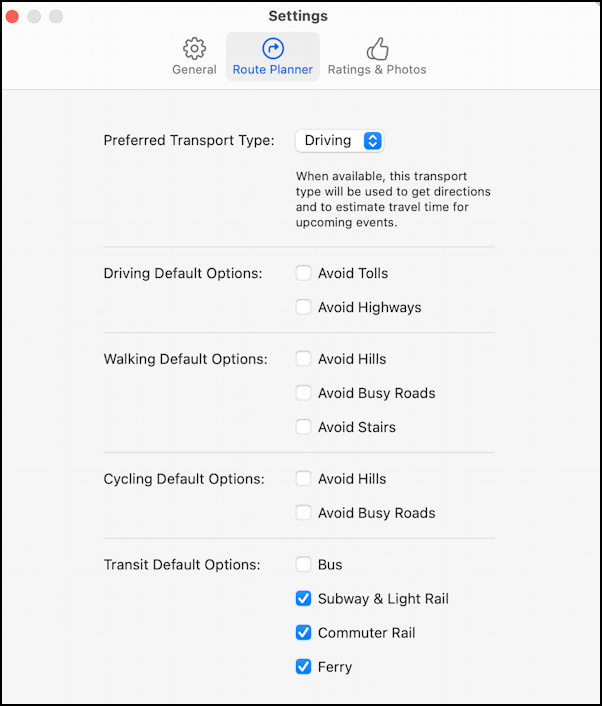
apple maps routing direction preferences settings - apple maps on macos

Basically the same routing options. Just make sure that they have the same settings as what you’ve specified on your iPhone and you should be good to route yourself to your destination safely, whether on your bicycle or in your car.

Good luck!

Pro Tip: I’ve been writing tutorials for both the Apple iPhone and Mac since they was first released. Please check out my extensive Mac help area and iPhone help area for lots and lots of useful content.

Enjoy watching videos? I've got hundreds of lively and interesting product reviews you can enjoy with just a click. Please check 'em out: AskDaveTaylor Video Gallery.

About the Author: Dave Taylor has been involved with the online world since the early days of the Internet. Author of over 20 technical books, he runs the popular AskDaveTaylor.com tech help site. You can also find his gadget reviews on YouTube and chat with him on X as @DaveTaylor.

Let’s Stay In Touch!

Never miss a single article, review or tutorial here on AskDaveTaylor, sign up for my fun weekly newsletter!
Name: 
Your email address:*
Please enter all required fields
Correct invalid entries
No spam, ever. Promise. Powered by FeedBlitz
Please choose a color:
Starbucks coffee cup I do have a lot to say, and questions of my own for that matter, but first I'd like to say thank you, Dave, for all your helpful information by buying you a cup of coffee!
apple maps, apple maps route preferences

Leave a Reply Cancel reply

Your email address will not be published. Required fields are marked *

Search

Recent Posts

  • How to Update the Software on your KOBO Ebook Reader
  • How to Change Your Default Web Browser in Windows
  • How to Check for Spam DM’s in Facebook Messenger
  • How to Automatically Close Your Garage Door with MyQ App
  • Best Time to Post on Facebook Business Pages?

On Our YouTube Channel

The NearHub Frames 10 Smart Photo Frame Really is SMART

Endless Cleaning with the Roborock Q10 S5+ Robot Vacuum & Mop

Categories

  • AdSense, AdWords, and PPC Help (106)
  • AI and ChatGPT Help (75)
  • Alexa, Kindle, and Nook Help (112)
  • Amazon, eBay, and Online Shopping Help (176)
  • Android Help (321)
  • Apple iPad Help (156)
  • Apple Watch & Smartwatch Help (63)
  • Articles, Tutorials, and Reviews (361)
  • Auto Tech Help (31)
  • Business Advice (202)
  • Chromebook & ChromeOS Help (80)
  • Computer & Internet Basics (847)
  • d) None of the Above (169)
  • Facebook Help (405)
  • Google, Chrome & Gmail Help (227)
  • HTML & Web Page Design (249)
  • Instagram, Bluesky & Threads Help (70)
  • iPhone & iOS Help (702)
  • iPod & MP3 Player Help (173)
  • LinkedIn Help (98)
  • Linux Help (182)
  • Linux Shell Script Programming (95)
  • Mac & MacOS Help (994)
  • Microsoft Outlook and Office 365 Help (53)
  • Most Popular (16)
  • PayPal Help (69)
  • Pinterest Help (58)
  • Reddit Help (24)
  • SEO & Marketing (83)
  • Spam, Scams & Security (130)
  • Trade Show News & Updates (23)
  • Video Game Tips (66)
  • Web Site Traffic Tips (62)
  • Windows PC Help (1,093)
  • Wordpress Help (207)
  • Writing and Publishing (72)
  • X/Twitter Help (233)
  • YouTube Help (54)
  • YouTube Video Reviews (159)
  • Zoom, Skype & Video Chat Help (80)

Archives

Social Connections:

Ask Dave Taylor


Follow Me on Pinterest
Follow me on Twitter
Follow me on LinkedIn
Follow me on Instagram


AskDaveTaylor on Facebook


microsoft insider mvp


This web site is for the purpose of disseminating information for educational purposes, free of charge, for the benefit of all visitors. We take great care to provide quality information. However, we do not guarantee, and accept no legal liability whatsoever arising from or connected to, the accuracy, reliability, currency or completeness of any material contained on this site or on any linked site. Further, please note that by submitting a question or comment you're agreeing to our terms of service, which are: you relinquish any subsequent rights of ownership to your material by submitting it on this site. Our lawyer says "Thanks for your cooperation."
© 2025 by Dave Taylor. "Ask Dave Taylor®" is a registered trademark of Intuitive Stories, LLC.
FTC Notice: If you buy products through links on this site we may receive a modest affiliate commission. This won’t affect the price you pay.
Privacy Policy - Terms and Conditions - Accessibility Policy - Humix Video Content
  • Home
  • YouTube Channel
  • Most Popular
  • Newsletter!
  • Ask Me A Question
  • Meet Dave