
I had my old Mac laptop, an iBook, stolen and now that I have a new one, I realize that I can’t get the music off my Apple iPhone which is driving me crazy! Is there some way to sync the iPod music and video portion of my cellphone without having to start from scratch again?
Now that I’ve been moving everything onto my Macbook Air (which I love!) I am facing the very same issue: when I plug my iPhone into my Air, it just wants to reformat it and start me over from scratch. Not good!
However, all the standard utilities I tried couldn’t see the iPhone, which was super frustrating until I bumped into the latest beta release of Senuti, a slick free application that lets you copy music from your iPod onto your computer, even if the two aren’t paired.
I downloaded 1.50.2b3 (beta 3 version of 1.50.2) and was thrilled and delighted that programmer Whitney Young has clearly been experimenting with just this capability. When I installed it and plugged in my iPhone, it worked great!
First off, one of the terrific features of Mac OS X is that if you have an app that you downloaded from the net, the first thing you see is this:
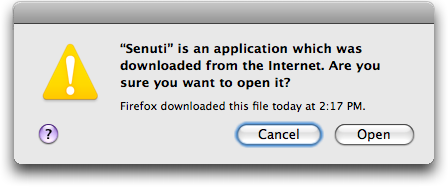
Great feature! Click on “Open” and now you’ll get to step through the first run configuration options. I don’t make any changes other than to select the following:
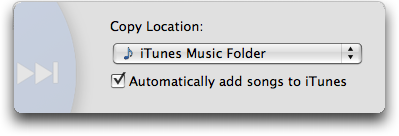
Since it’s your intention to also copy the music from your iPhone back into your iTunes library, you’ll also want to select this option.
Finally, the app’s ready to run and when I plug in my Apple iPhone, here’s all my music:
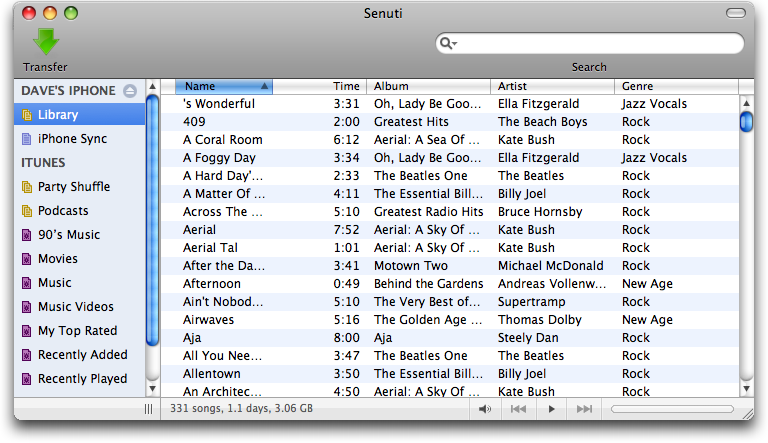
To copy everything, I just selected it all and clicked the green “Transfer” arrow. Now the transfer started: you see a tiny progress bar on the lower left, but if you click on the little “i” info icon, you get a more informative progress window:
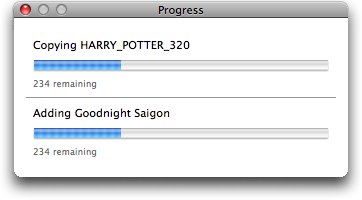
after a while – depending on how much music and how many movies you have (here, notice, I’m copying the Harry Potter movie from my phone to my Macbook) – you’ll finally see this:
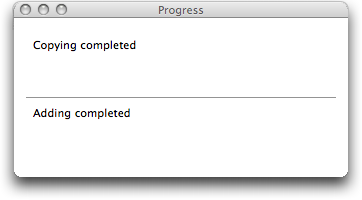
Hurray! Copied. Sure enough, go into iTunes and:
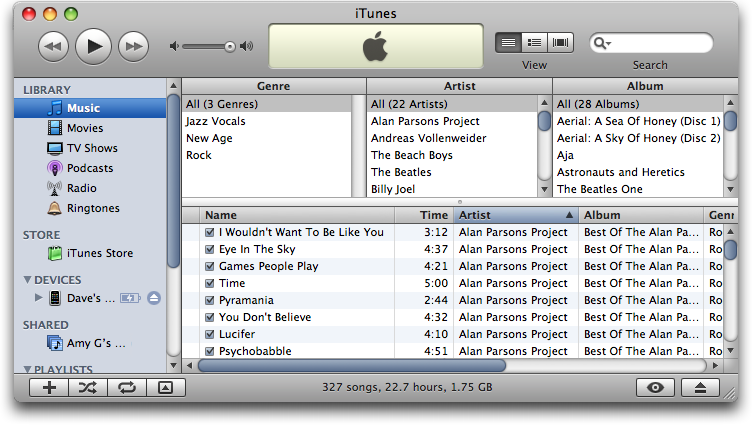
That’s the answer. In terms of grabbing your address book, SMS text, and related, I haven’t yet found a solution for, but perhaps someone else can offer up a suggestion?
We also offer similar services that includes: backup ipod music, copy ipod music to computer and restore ipod to pc.
Excelnt tanxx bro
Hi there, so I see you said that Senuti doesn’t recognize purchased music….so what do I do to transfer that?
Hi,
I have a problem.
This really helped me but, it doesn’t show the music i recently downloaded on Senuti.
How do i get the music that i just downloaded on my phone onto Senuti??
Thank you so much! So easy to use and I finally have all my tunes on my new macbook! You are a legend Dave!
I loaded music from my computer to my Iphone last night using your instructions. It worked! However, I have a question, I have some CD’s that has maybe 15-16 cuts and when it loaded on my Iphone it has 20 entries for that artist with say songs 1-8 then another entry with songs 9-15. I was surprised that it did not run them all under one artist name, or did I not so something?
Thanks so much for the info!! Very HeLpFuL!!! 🙂
Heres my problem, i upgraded to an IPhone4 from a Iphone3G, I have one app on my 3g that i want on my 4. I already have everything else tranferred, music, ringtones etc. But i cant get that 1 app to transer. Ive tried back ups, restores, transer bought items, but when i connect one phone it overwrites the apps or back ups from the other one. I just want this one freaking app i bought to transfer because its no longer available.
any help please email me rb_ruether@yahoo.com
Thanks
For PC users, try this
http://www.from-iphone-to-computer.com
Hey, When i downloaded this progrom it wont let my click the green transfer button i’m not very good with computers please PLEASE help
OH my goodness, I love this app!
Thank you x 100 for posting this!!
i had the same issue but downloaded touch copy, works on both pc and mac the full version is about $20 and the demo give you roughly 200 songs to copy.
i bought a new computer (mac air) and because i had already paid for it all i had to do was enter the registration code. best software i have ever bought.
how can I get my iphone to recognize phone numbers in the subject line, and get it to automatically dial the access code for 800 numbers. Some common char:
, = pause 3 seconds
# = entered at end of entry
For photos on the iPhone/iPod Mac users should try using Image Capture – it’s free, comes on the computer and will download some or all of your images from the iPhone/iPod so you can erase if you need to, or what to switch to sync’d photos like I’m trying to do. (if you decide to add movies, all your music gets the heave-ho, so back that up with Senuti)
I have to check, but there’s a software I bought in a MacHeist or Macupdate bundle that will access SMS messages, addressbooks etc on iPhone/iPod.
~M~
SO GREAT!!!!
Hi Dave!
Great info. I have a friend who is going through a divorce and has a shared iTunes account and can’t get access to her music except for the music on her iPhone. She has a new phone number and is wanting to set up a new iTunes acct. How can she get her music off her iPhone and load it onto her new iTunes account without running into the restrictions?
Thank you for your help!
Hi Dave,
I m hoping u can help me in transferring songs form computer to itunes?
I bought an iPod for my husband and he got his mate to put songs on first so whenever I went to put more songs on, it would say the message “can only sync to one iTunes library”. Anyhow I have followed internet steps that I saw on the net to transfer songs from ipod to computer but for some reason it will not copy into ITunes.
I transferred all the songs…2000 from the iPod to my desktop in a folder and also in a folder under iPod control but when I go to add folder or file in itunes, I can select the folders but it adds nothing, also when I drag them from the folder to the library in iTunes, it comes up with the copy symbol but does not copy over.
The only way I seem to be able to get them across is if I open the folder and double click on each individual song, then it opens to play in ITunes and seems to be there then. But surely I have done something wrong and there is an easier way then playing 2000 songs to transfer them across???
Oh and prob helpful for you to know that I have Visa premium.
THANK YOU! THANK YOU! THANK YOU! THANK YOU!
Our macbook pro was stolen in Mexico…. We now have our music back on our new computer!
Robyn, try this:
https://www.askdavetaylor.com/review_ipodrobot_music_copying_utility_for_windows.html
Hi there,
I tried to download Senuti, but it looks like it’s a mac program. Is there a similar program you could recommend for a pc user, such as myself?
Thanks!
Robyn
Just be aware that if you are like me and purchased any songs directly on your ipod, Senuti won’t recognize them (for instance, I purchased a number of albums at work on my phone, then got home, and Senuti just doesn’t recognize those songs. It recognizes things purchased from my laptop’s iTunes, but not things purchased directly on my phone. Senuti’s support staff acknowledged this was on purpose.)
Senuti is OK on Mac.
On PC, CopyTrans http://www.copytrans.net allows you to get songs of your iPhone and it can also import your playlists and other stuff to iTunes.
Posted by: me at June 24, 2008 10:41 AM
Thank you for the link mate, you’ve saved me from loosing over 30gig of music and priceless photos!
Amazing, worked really well!!
THE BEST APP EVER!
Senuti has problems with songs purchased on the iPhone. It doesn’t even see them – any help on how to get to these songs?
Thanks
hey dave , need help, i had on my iphone music and movies .then i joined itunes and my music and movies not on phone. still in library, what can i do???thanks
Try Media Monkey on PC. It is free and works great. I’ve even used to fix a corrupt music db on my iPhone. Not to mention its the best app to organize all your tags in your music library. I don’t work for them, I’ve just wasted lots of time and junked up my PC with crap before discovering MM. Give it a try!
For me the easiest and cheaper way is CopyTrans (http://www.copytrans.net).
It works very fine and I didn’t have any problem.
Thanks DaveTaylor for your amazing website 🙂
Strawbie
well i went through my old laptop crashing and losing all my songs and what not…bought Senuti and it actually works…
Actually, Madi, there are a variety of solutions out there for your situation. Check out this writeup: https://www.askdavetaylor.com/review_ipodrobot_music_copying_utility_for_windows.html
Hope that helps!
I have an iphone 3g and my computer just crashed ofcourse that means my itunes also. I am on a vista laptop now and can not get my music off my phone to the new itunes i set up. Please help!
I don’t have Internet I have iTunes 8 how do I add music to
iPhone 3g without losing what is on iPhone 3g very frustrated need help please anybody thanks
ok swithced the phone today and all contacts have appeared. still need help to upload music and photos from my laptop to the unlocked iphone and vice versa without having to get locked using apple ‘legit’ softwares
i also cant get the phone (unlocked) to read my sim card. I can use the phone though. So is there some way to get the Iphone to read the sim contacts and contents already on it?
hi dave, please help. i have an unlocked new iphone and i want to upload music from my laptop to the iphone. what software should i downlaod that will not go to Itunes, otherwise it will lock the phone 🙁 thanks
how can i transfer music from my iphone to the laptop ? i have windows vista. PLEASE HELP!!!!!!!!!!!!!!!!!!!!!!!!
Thank You.
CopyTrans works fine to get music off the iPhone.
awesome guide!!
i have a problem. Senuti turns off randomly when i start transfering my music. why is that?
After installing the new version of Senuti it didnt ask where to transfer the files. When all my songs come up after plugging in my Iphone I click on the transfer button an nothing happens. What can I do?
Senuti is OK on Mac.
On PC, CopyTrans http://www.copytrans.net allows you to get songs of your iPhone and it can also import your playlists and other stuff to iTunes.
For it putting all your texts and address book on should be done automatically. Even if you’ve never synced before but just plugged it in for a charge it should back everything up.
I recently use Adobe to transfer my Iphone family pictures to Adobe and then I was able to delete them from my Iphone. At the time Adobe recognized my Iphone ( I was also using Itunes)but now I am unable to get Adobe to recognized my Iphone and cannot delete pictures from my Iphone. Any suggestions? Thanks for your useful columns. I like to take old pictures of from my IPhone and then add new ones.
Jerry
Make sure you get the *BETA* version of Senuti: the production download doesn’t yet include this capability, from what I can tell.
hi. thanks for all that but i have a similar problem 🙁 senuti does not recognize my iphone. please help! thanks a ton.
excellent. this is just what i had been looking for.
i am traveling and just bought a mac. to my dismay itunes wouldnt let me download stuff from my iphone.
will keep checking your page. good stuff.
this seems great, but help! when i plug in my iphone it doesn’t seem to recognize it, and NOTHING pops up. please help
This worked great for songs, but how about photos?
If I could figure out how to get music onto my iPhone and manage it without having to use iTunes, I would be a very, very happy man. iTunes is one of the least usable and most commercially irritating computer applications I have ever had to face… it makes Internet Explorer 6 look like a saint.
Any ideas on how a Mac user can use an iPhone without iTunes at all? SongBird has an iPod module, but it doesn’t work with iPhone (yet) due to Apple’s encryption and obfuscation efforts.