
Am currently in the uk and here the domain for gmail account is @googlemail.com. I recently created a gmail account and i was wondering whether theres a way to change my address from username@googlemail.com to username@gmail.com? I know that whether you write username@gmail.com and username@googlemail.com get delivered to the same inbox..but still want to change the domain of my email add! :))
I never realized that “googlemail.com” and “gmail.com” were functionally equivalent. Cool! 🙂
Now, on to your question. Yes, in Google Gmail there is indeed a way that you can set your “from” address to be what you desire rather than the default for your particular configuration.
Log in to your account, then click “Settings” on the top right, then click on the “Accounts” tab. You’ll see this:
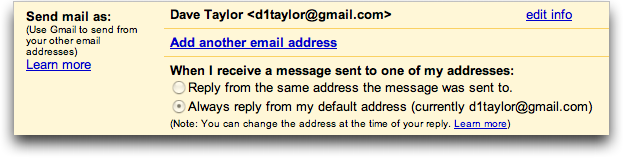
I’m guessing yours indicates “@googlemail.com”. Click on “edit info” and you’ll find that you can actually change your return name (very helpful) and email address:
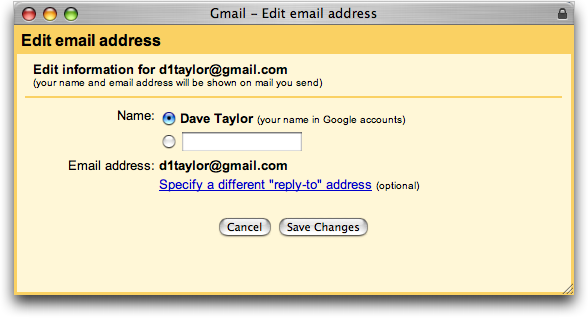
If you’d like to change your name while you’re here, just enter a new value and click on “Save Changes”. To change the email address, click on the link “Specify a different ‘reply-to’ address” and you’ll see:
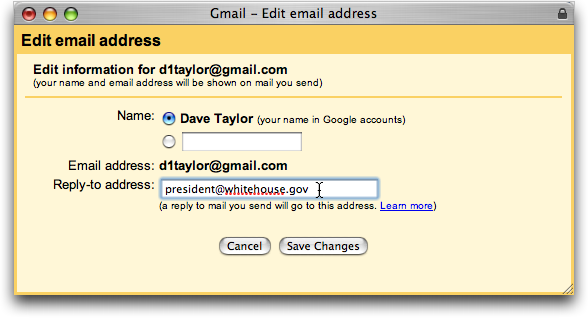
Ah, as you can see, you can change your “Reply-To:” address, but in fact you cannot change your “From” address here in Gmail. (Further, I am not seriously suggesting that “president@whitehouse.gov” would be a sensible return address for your email. Especially if you’re in the UK! 🙂
What you can try, however, is to add a completely new email address and specify that as the default address. Back up and click on “Add Another Email Address”, and you’ll see:
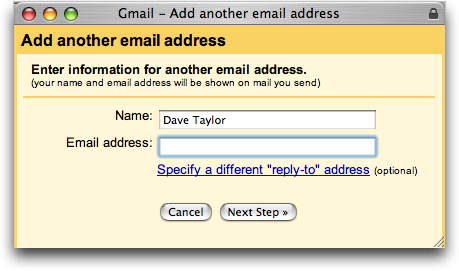
Now enter the @gmail.com address to override your @googlemail.com address and click “Next Step”.
Smack! Right into a brick wall:
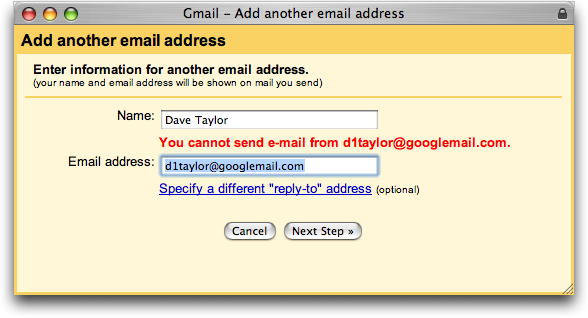
So, indeed, it appears that the answer is that you cannot pretend to be with the gmail.com side if you’re hooked into the googlemail.com side.
Oh, there is one solution. Fly out here to the States, set up a regular Gmail account for yourself, then use that when you’re in the UK instead. A bit expensive as a solution, but I imagine that Google is using IP location services to put Europeans on googlemail.com while us folk here in the States get gmail.com instead.
Please Dave, i need help changing my home address on my gmail account. I mean the one with which i signed up for it. I moved house and my address has changed and because i have engaged in something that requires that i receive a message from Google at my address, i cannot but make that change. Thanks un avance
Why don’t you just sign up for the new email address, Michele, then set up your email on the old address to forward everything to the new one?
PLEEEEEEZ HELP ME DAVE…
My email address is
allbangstrumit@gmail.com
but would like to change it to
ronniesallbangandstrumit@gmail.com
keeping the same username and password.
I do know that if I delete allbangstrumit@gmail.com and create a new gmail account, I cannot keep the same username and password but dont want that – just wanna change the gmail.com name.
I would SO appreciate it if you could help me.
Thanking you in advance.
i want to change my email address and i have forgot the password
Clear the cache, I mean dump everything..that’s probably the issue. Changing the main admin email for my wingback headboard website could run into the same issue. Its cPanel email an not Gmail but the cache may still be the culprit.
i want to change the domin name
i want my own name as domin name
Paul, an interesting problem. I am betting that it’s a cache issue in your browser, however. Try this: download something like Firefox or Google Chrome, a browser that you’ve never used before, then go to Gmail and try typing in that address. If it still shows up, search your Contacts to see if you have the address included. If so, delete it. Good luck!
Hi,
I have a weird issue with my Gmail Return To: field going on. I purchased a business a few years ago, along with it came the info@studiorally.ca email address. I have had all of my email channeled through Gmail from my service provider. He can’t seem to shed any light on this, he figures it’s a function of Gmail…and he knows a lot more than me.
Now,when I type in the info@studiorally.ca – the official email address,(I do this in the Send To: field when, for example, I send out a mass email to the addresses of my membership) the name of the person I purchased it from comes up in the field as the prefix to the info@studiorally.ca address in quotes, and it appears to all receiving the email that that the email is being sent to her as the primary recipient. Frankly, I made the mistake of assuming it was only showing that way from my computer due to some grandfathered default as I had no success in even locating any instance of her name in any of my settings, nor do I now. What I did to check this out was, in my Gmail account- go into Settings, Accounts and Import, Send mail as, then edit. The right email address is showing as the official info@studiorally.ca address, but no mention of the person’s name that appears when I type it in…??!!
(help)
Paul
Barry, if you are trying to send email to 800 people at once, you’re not using the right tool. I would suggest that you create a Google Group and then it’s a breeze to figure out which addresses don’t work AND the rest are set out without a hitch. Go to http://groups.google.com/
Or if you prefer a non-Google solution, Yahoo has a very nice groups interface system too: http://groups.yahoo.com/
Any ideas? I tried to send out an gmail bulk mail with over 800 names..it wouldn’t send it because an error cam up saying that some of the address’s weren’t correct…how do you go through each any every address??? Why can’t it send out the bulk mail an leave behind the ones that need fixing? or at least tell you the ones that have the problem??? Help!
I want to set my own e-mail at g-mail.
i cant open my friendster bec i put a gmail to it waht can i do?? i really cant open my account.. help me please?…
Access gmail.com via a U.S. proxy and also set your country as United States when creating the gmail account.
There you have yourself a @gmail.com account.
I think you can just tell people it’s @gmail.com – you’ll still receive it, but those you send will still appear as from googlemail unfortunatly.
Why does my name as above now read as
Ross Smithhacing ? on outgoing emails.
how can I change my name (gerard ross) to appear as the email address (gs2szczy) on outgoing emails ?