
Ask Dave Taylor
  • Facebook
  • Instagram
  • Linkedin
  • Pinterest
  • Twitter
  • YouTube
  • Home
  • YouTube Channel
  • Most Popular
  • Newsletter!
  • Ask Me A Question
  • Meet Dave
  • Home
  • HTML & Web Page Design
  • Get traffic stats for a specific page in Google Analytics?

Get traffic stats for a specific page in Google Analytics?

May 24, 2010 / Dave Taylor / HTML & Web Page Design, Web Site Traffic Tips / 12 Comments

I’ve been using Google Analytics for a while and a client just asked me about the traffic on a specific page. I logged into the Analytics site and dug around everywhere, but can’t see anywhere I can actually just type in a URL and find the stats for that specific page. Is it possible, or is that just not how Google Analytics works?

  ★ ASKDAVETAYLOR WEEKLY EMAIL! ★
Guaranteed to Make you Smarter.
Click Here to Subscribe.

When I first read this question, I was pretty convinced that the answer was no, but I asked this question on Twitter (you can follow me to see these sort of questions if you’d like: I’m @DaveTaylor) and found out that there is indeed a way to accomplish what you seek, though it’s so complicated that I asked the chap who shared his info — @robertpatterson — twice to help me figure it out.
Fortunately I was taking screen shots as I went along, so I think you won’t find it quite so baffling.
The ironic thing, however, was that my first test was to figure out how often people visit the Ask Dave A Question page, just to realize that it was one of the pages I’d forgotten to include the Google Analytics code in the first place, so… no traffic data at all. For this demo I opted to look at my parenting blog instead, as you’ll see.
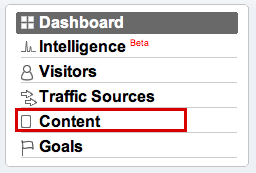
Start by logging in to your Google Analytics account and looking on the left side:
google analytics page traffic 1

As you can see from my highlight, click on “Content” and you’ll see it opens up and offers a variety of different content-related options:
google analytics page traffic 2

Choose “Top Content”. Now you’ll see a pretty complicated page of information:
google analytics page traffic 3

Scroll down to the bottom of the page — that’s the secret! — and there’s a small search box where you can enter a specific URL or a subset that matches a set of URLs.
I’ll search for the articles I’ve written on my parenting blog about Cirque du Soleil by using the name as it shows up in my URLs:
google analytics page traffic 4

The resultant information shown is for the page or pages that match. For me, there are 7 pages that Google Analytics are tracking that have the pattern “cirque_du_soleil”, and here are the basic stats for them:
google analytics page traffic 5

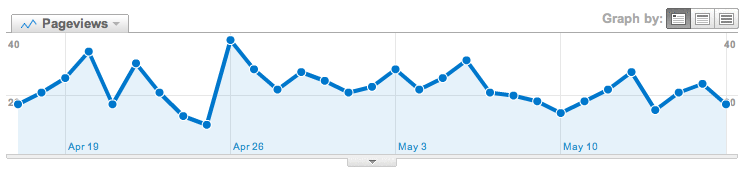
And, of course, a pretty graphical representation of the traffic trends:
google analytics page traffic 6

That’s it. Turns out that there’s a lot you can find out in Analytics if you have the patience to poke around and experiment. I recommend you spend some time poking around!

Enjoy watching videos? I've got hundreds of lively and interesting product reviews you can enjoy with just a click. Please check 'em out: AskDaveTaylor Video Gallery.

About the Author: Dave Taylor has been involved with the online world since the early days of the Internet. Author of over 20 technical books, he runs the popular AskDaveTaylor.com tech help site. You can also find his gadget reviews on YouTube and chat with him on X as @DaveTaylor.

Let’s Stay In Touch!

Never miss a single article, review or tutorial here on AskDaveTaylor, sign up for my fun weekly newsletter!
Name: 
Your email address:*
Please enter all required fields
Correct invalid entries
No spam, ever. Promise. Powered by FeedBlitz
Please choose a color:
Starbucks coffee cup I do have a lot to say, and questions of my own for that matter, but first I'd like to say thank you, Dave, for all your helpful information by buying you a cup of coffee!

12 comments on “Get traffic stats for a specific page in Google Analytics?”

  1. Bob says:
    December 30, 2013 at 5:11 am

    This is outdated, there is no way of tracking a single page I can find. Well done Google for making a simple tool useless!

    Reply
    • Lore says:
      January 6, 2014 at 3:10 am

      Bob,
      go to “Behaviour / Site Content / All Pages”
      click on “advanced” next to the search box. there you find the filter field described in this post.
      Best
      Lore

      Reply
      • Ricardo Johnson says:
        January 10, 2014 at 3:02 pm

        How do you get the number of hits on a page for all 2013?

        Reply
        • Tara says:
          February 27, 2014 at 12:49 pm

          Ricardo, you just have to change the dates at the top-right corner. You can set them to any time frame you want.

          Reply
      • Tara says:
        February 27, 2014 at 12:47 pm

        You actually went a step further than you had to in order to view the traffic on one specific page. The search box next to the “advanced” link allows you to search any specific URL on your site.

        Reply
      • Priya says:
        January 4, 2016 at 2:26 am

        thanku so much. this is what i have searched for

        Reply
    • kevin says:
      December 4, 2014 at 12:29 pm

      Update –
      go in to “behavior” > site content>all pages
      under the graph there is (or should be) a search box

      if the page you want to view is
      http://www.yoursite.com/apples

      just type
      /apples

      in the search box

      Reply
      • Robert L says:
        January 26, 2015 at 9:16 am

        Can you only filter by URL? How about other meta data on a page?

        Reply
  2. charles Leahy says:
    May 4, 2013 at 1:36 pm

    What I am trying to do is find where the traffic came from that page, and ideas? Thanks

    Reply
  3. Lori says:
    April 16, 2013 at 11:57 am

    I do not have an option called ‘Top Content’. The options I see under Content are:
    Overview
    Site Content
    >All pages
    >Content Drilldown
    >Landing Pages
    >Exit Pages
    Site Speed
    Site Search
    Events
    AdSense
    Experiments
    In-Page Analytics
    Any ideas about this?
    Thanks!

    Reply
  4. jeremy says:
    June 22, 2012 at 12:22 pm

    good info, but this is outdated

    Reply
  5. Kida says:
    December 22, 2010 at 5:02 am

    Really great to find this information. I was looking and looking without any luck. Turns out I was on the right page just needed to find the filter at the bottom. Thanks for sharing 😀

    Reply

Leave a Reply Cancel reply

Your email address will not be published. Required fields are marked *

Search

Recent Posts

  • How to Update the Software on your KOBO Ebook Reader
  • How to Change Your Default Web Browser in Windows
  • How to Check for Spam DM’s in Facebook Messenger
  • How to Automatically Close Your Garage Door with MyQ App
  • Best Time to Post on Facebook Business Pages?

On Our YouTube Channel

Endless Cleaning with the Roborock Q10 S5+ Robot Vacuum & Mop

Cleer ARC 4 Open Ear Headphones: Ideal for Outdoors - DEMO & REVIEW

Categories

  • AdSense, AdWords, and PPC Help (106)
  • AI and ChatGPT Help (75)
  • Alexa, Kindle, and Nook Help (112)
  • Amazon, eBay, and Online Shopping Help (176)
  • Android Help (321)
  • Apple iPad Help (156)
  • Apple Watch & Smartwatch Help (63)
  • Articles, Tutorials, and Reviews (361)
  • Auto Tech Help (31)
  • Business Advice (202)
  • Chromebook & ChromeOS Help (80)
  • Computer & Internet Basics (847)
  • d) None of the Above (169)
  • Facebook Help (405)
  • Google, Chrome & Gmail Help (227)
  • HTML & Web Page Design (249)
  • Instagram, Bluesky & Threads Help (70)
  • iPhone & iOS Help (702)
  • iPod & MP3 Player Help (173)
  • LinkedIn Help (98)
  • Linux Help (182)
  • Linux Shell Script Programming (95)
  • Mac & MacOS Help (994)
  • Microsoft Outlook and Office 365 Help (53)
  • Most Popular (16)
  • PayPal Help (69)
  • Pinterest Help (58)
  • Reddit Help (24)
  • SEO & Marketing (83)
  • Spam, Scams & Security (130)
  • Trade Show News & Updates (23)
  • Video Game Tips (66)
  • Web Site Traffic Tips (62)
  • Windows PC Help (1,093)
  • Wordpress Help (207)
  • Writing and Publishing (72)
  • X/Twitter Help (233)
  • YouTube Help (54)
  • YouTube Video Reviews (159)
  • Zoom, Skype & Video Chat Help (80)

Archives

Social Connections:

Ask Dave Taylor


Follow Me on Pinterest
Follow me on Twitter
Follow me on LinkedIn
Follow me on Instagram


AskDaveTaylor on Facebook


microsoft insider mvp


This web site is for the purpose of disseminating information for educational purposes, free of charge, for the benefit of all visitors. We take great care to provide quality information. However, we do not guarantee, and accept no legal liability whatsoever arising from or connected to, the accuracy, reliability, currency or completeness of any material contained on this site or on any linked site. Further, please note that by submitting a question or comment you're agreeing to our terms of service, which are: you relinquish any subsequent rights of ownership to your material by submitting it on this site. Our lawyer says "Thanks for your cooperation."
© 2025 by Dave Taylor. "Ask Dave Taylor®" is a registered trademark of Intuitive Stories, LLC.
FTC Notice: If you buy products through links on this site we may receive a modest affiliate commission. This won’t affect the price you pay.
Privacy Policy - Terms and Conditions - Accessibility Policy - Humix Video Content
  • Home
  • YouTube Channel
  • Most Popular
  • Newsletter!
  • Ask Me A Question
  • Meet Dave