
Ask Dave Taylor
  • Facebook
  • Instagram
  • Linkedin
  • Pinterest
  • Twitter
  • YouTube
  • Home
  • YouTube Channel
  • Most Popular
  • Newsletter!
  • Ask Me A Question
  • Meet Dave
  • Home
  • HTML & Web Page Design
  • Why is JPEG considered a “lossy” graphics format?

Why is JPEG considered a “lossy” graphics format?

August 21, 2005 / Dave Taylor / HTML & Web Page Design / 6 Comments

I’m just starting out in the Web world and was just told by someone else who I respect that I should be careful with the JPEG graphics format because it’s “lossy”. I have no idea what that means, however. Can you enlighten me?

  ★ ASKDAVETAYLOR WEEKLY EMAIL! ★
Guaranteed to Make you Smarter.
Click Here to Subscribe.

While I’m a big fan of the JPEG graphics format myself – just about every screenshot on Ask Dave Taylor is in JPEG format – I know exactly what your friend is talking about. A lossy graphics format is one where a small amount of information about the original picture is lost each time the image is saved.
To understand why that happens, it’s critical that you know that the Joint Photographic Experts Group “JPEG” format uses a compression algorithm to try and shrink down the resultant image file size. You can see this quite easily by creating a 100×100 pixel solid black image then saving it as a JPEG. It’ll be amazingly small considering that it’s actually holding information on 10,000 different individual pixels or dots of information (on my Mac, it’s only 823 bytes in size).
The specific compression that JPEG uses is quite fascinating, built upon fractals and Mandelbrot sets, but that’s another story entirely (which you can start learning about at Bernard Mandelbrot’s site)
Anyway, back to lossy JPEG compression!
The problem is that when JPEG compressed images are re-expanded, there’s just less information available than there had been before. This doesn’t change for a given static JPEG file, but if you keep editing the file, each time you save it, you’re compressing it a bit more, that is, losing a bit more information from the original.
Let’s have a quick look. First off, here’s a nice, detailed original image I’m going to start with:

Tiger Photo, 100% quality, JPEG

This is saved in 100% quality so while it has some loss simply because it’s in JPEG format, it’s the minimum possible.
Now I’m going to open up and save the image a half-dozen times, using 75% image quality each time so I’ve got a constantly degrading image. Here’s the result:

Tiger Photo, less than 30% quality, JPEG

It still looks surprisingly good, given that the first image is 190Kbytes and the second is only 18Kbytes. A testimonial to the brilliance of the compression algorithm.
But we have lost data. Let’s zoom in on the tiger’s eye and you’ll be able to see what I mean.
In the following image, the eye on the left is from the original Tiger image, and the eye on the right is the same section of the photo, but from the highly compressed file:
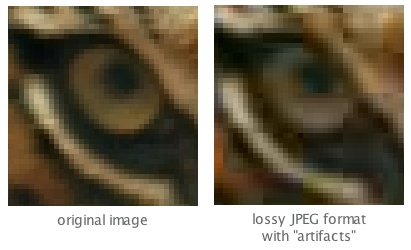
Tiger Photo, display of JPEG compression loss

As is clearly obvious, the price we’ve paid for a much smaller file size is that we’ve lost quite a bit of the original image detail. In pictures of this nature, it might not seem terrible, but the loss of image data in JPEG format is a significant issue for photographers and others who need to retain original image quality.
Anyway, I hope that clarifies why JPEG is considered a “lossy” format!

Enjoy watching videos? I've got hundreds of lively and interesting product reviews you can enjoy with just a click. Please check 'em out: AskDaveTaylor Video Gallery.

About the Author: Dave Taylor has been involved with the online world since the early days of the Internet. Author of over 20 technical books, he runs the popular AskDaveTaylor.com tech help site. You can also find his gadget reviews on YouTube and chat with him on X as @DaveTaylor.

Let’s Stay In Touch!

Never miss a single article, review or tutorial here on AskDaveTaylor, sign up for my fun weekly newsletter!
Name: 
Your email address:*
Please enter all required fields
Correct invalid entries
No spam, ever. Promise. Powered by FeedBlitz
Please choose a color:
Starbucks coffee cup I do have a lot to say, and questions of my own for that matter, but first I'd like to say thank you, Dave, for all your helpful information by buying you a cup of coffee!

6 comments on “Why is JPEG considered a “lossy” graphics format?”

  1. toshu says:
    December 23, 2010 at 4:00 am

    thank u sir

    Reply
  2. persephone says:
    October 24, 2010 at 10:08 am

    “PNG is frequently better suited, not least because PNG files are often smaller than their JPEG counterparts” http://www.xlo.co/blog/general/png-vs-jpeg

    Reply
  3. Dave Taylor says:
    August 24, 2005 at 5:40 am

    I agree with your assessment, Kevin, except that from my experience producing a site with a wide readership, I know that not every browser out there has support for PNG format. Then GIFs have problems of their own if you use more than 256 colors or seek color fidelity. Everything has pro’s and con’s, of course.

    Reply
  4. Kevin says:
    August 24, 2005 at 5:02 am

    As you yourself pointed out, JPEG stands for Joint Photographic Experts Group. The key word here is “photographic”.
    You also said “just about every screenshot on Ask Dave Taylor is in JPEG format”. Given that JPEG is specifically tuned for photographs, why would you choose it for screenshots? It tends to make unnecessarily bulky and ugly screenshots (and icons, line art, etc.) compared to other formats (specifically GIF and 8-bit PNG). Try it yourself. Compress a screenshot with JPEG and GIF and compare them. 8-bit PNG is even better than GIF, but requires a bit more knowledge of what you are doing — if you end up with a 24- or 32-bit PNG, it won’t be smaller.
    JPEG is designed specifically for photographs. It performs well there, but generally not in other areas. There are more appropriate formats for other purposes.

    Reply
  5. Dave Taylor says:
    August 22, 2005 at 5:53 am

    Ah, you’re absolutely correct, Paul. I don’t know where “fractal” got stuck in my head about JPEG compression algorithms. In any case, whatever algorithm is used, the explanation of why JPEG is a “lossy” graphics format is still valid.

    Reply
  6. Paul Kosinski says:
    August 21, 2005 at 11:52 pm

    I believe JPEG is based on the Discrete Cosine Transform (DCT) followed by quantization — a sort of “rounding”, which is the lossy part — followed by Huffman (or even arithmetic) coding, and *not* on Fractals or Mandlebrot sets.
    See http://www.faqs.org/faqs/compression-faq/part2/

    Reply

Leave a Reply Cancel reply

Your email address will not be published. Required fields are marked *

Search

Recent Posts

  • How to Update the Software on your KOBO Ebook Reader
  • How to Change Your Default Web Browser in Windows
  • How to Check for Spam DM’s in Facebook Messenger
  • How to Automatically Close Your Garage Door with MyQ App
  • Best Time to Post on Facebook Business Pages?

On Our YouTube Channel

Endless Cleaning with the Roborock Q10 S5+ Robot Vacuum & Mop

Cleer ARC 4 Open Ear Headphones: Ideal for Outdoors - DEMO & REVIEW

Categories

  • AdSense, AdWords, and PPC Help (106)
  • AI and ChatGPT Help (75)
  • Alexa, Kindle, and Nook Help (112)
  • Amazon, eBay, and Online Shopping Help (176)
  • Android Help (321)
  • Apple iPad Help (156)
  • Apple Watch & Smartwatch Help (63)
  • Articles, Tutorials, and Reviews (361)
  • Auto Tech Help (31)
  • Business Advice (202)
  • Chromebook & ChromeOS Help (80)
  • Computer & Internet Basics (847)
  • d) None of the Above (169)
  • Facebook Help (405)
  • Google, Chrome & Gmail Help (227)
  • HTML & Web Page Design (249)
  • Instagram, Bluesky & Threads Help (70)
  • iPhone & iOS Help (702)
  • iPod & MP3 Player Help (173)
  • LinkedIn Help (98)
  • Linux Help (182)
  • Linux Shell Script Programming (95)
  • Mac & MacOS Help (994)
  • Microsoft Outlook and Office 365 Help (53)
  • Most Popular (16)
  • PayPal Help (69)
  • Pinterest Help (58)
  • Reddit Help (24)
  • SEO & Marketing (83)
  • Spam, Scams & Security (130)
  • Trade Show News & Updates (23)
  • Video Game Tips (66)
  • Web Site Traffic Tips (62)
  • Windows PC Help (1,093)
  • Wordpress Help (207)
  • Writing and Publishing (72)
  • X/Twitter Help (233)
  • YouTube Help (54)
  • YouTube Video Reviews (159)
  • Zoom, Skype & Video Chat Help (80)

Archives

Social Connections:

Ask Dave Taylor


Follow Me on Pinterest
Follow me on Twitter
Follow me on LinkedIn
Follow me on Instagram


AskDaveTaylor on Facebook


microsoft insider mvp


This web site is for the purpose of disseminating information for educational purposes, free of charge, for the benefit of all visitors. We take great care to provide quality information. However, we do not guarantee, and accept no legal liability whatsoever arising from or connected to, the accuracy, reliability, currency or completeness of any material contained on this site or on any linked site. Further, please note that by submitting a question or comment you're agreeing to our terms of service, which are: you relinquish any subsequent rights of ownership to your material by submitting it on this site. Our lawyer says "Thanks for your cooperation."
© 2025 by Dave Taylor. "Ask Dave Taylor®" is a registered trademark of Intuitive Stories, LLC.
FTC Notice: If you buy products through links on this site we may receive a modest affiliate commission. This won’t affect the price you pay.
Privacy Policy - Terms and Conditions - Accessibility Policy - Humix Video Content
  • Home
  • YouTube Channel
  • Most Popular
  • Newsletter!
  • Ask Me A Question
  • Meet Dave