
Ask Dave Taylor
  • Facebook
  • Instagram
  • Linkedin
  • Pinterest
  • Twitter
  • YouTube
  • Home
  • YouTube Channel
  • Most Popular
  • Newsletter!
  • Ask Me A Question
  • Meet Dave
  • Home
  • Windows PC Help
  • Why do I need a password to leave my screensaver?

Why do I need a password to leave my screensaver?

December 15, 2005 / Dave Taylor / Windows PC Help / 5 Comments

Okay, I am running Win XP. Right now, when there is no activity on my machine for about 5 minutes, the computer locks. In order to unlock it, I need to type in my username/password.
I don’t have a screensaver running, so the “on resume, password protect” solution isn’t affecting the situation.
I would like to either disable the locking feature altogether, or at least increase the wait time before it locks.

  ★ ASKDAVETAYLOR WEEKLY EMAIL! ★
Guaranteed to Make you Smarter.
Click Here to Subscribe.

You’re not the first person to be stymied by this particular problem, but the good news is that there’s one simple setting in Windows XP that will let you customize this to your needs.
Click on START –> Settings –> Display, then click on the Screen Saver tab and you’ll see:
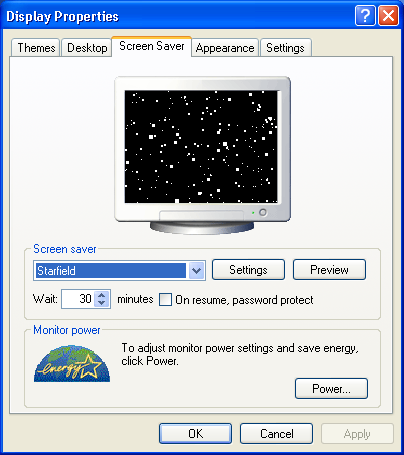
Windows XP Screensaver

As you can see, there’s a small box where you can specify how long before the screensaver starts up (I have 30 minutes specified).
If you don’t like having the screensaver prompt you for your password each time, you can also uncheck the On resume, password protect box (as I do).
That should get you all fixed up, and good luck to you!

Enjoy watching videos? I've got hundreds of lively and interesting product reviews you can enjoy with just a click. Please check 'em out: AskDaveTaylor Video Gallery.

About the Author: Dave Taylor has been involved with the online world since the early days of the Internet. Author of over 20 technical books, he runs the popular AskDaveTaylor.com tech help site. You can also find his gadget reviews on YouTube and chat with him on X as @DaveTaylor.

Let’s Stay In Touch!

Never miss a single article, review or tutorial here on AskDaveTaylor, sign up for my fun weekly newsletter!
Name: 
Your email address:*
Please enter all required fields
Correct invalid entries
No spam, ever. Promise. Powered by FeedBlitz
Please choose a color:
Starbucks coffee cup I do have a lot to say, and questions of my own for that matter, but first I'd like to say thank you, Dave, for all your helpful information by buying you a cup of coffee!

5 comments on “Why do I need a password to leave my screensaver?”

  1. Pokendi says:
    April 27, 2008 at 7:36 pm

    Hi,
    I am running on a Win XP environment. Right now, i want to change my screen saver settings from “on resume, password protect” to “on resume, display welcome screen”…
    Can u please help me…

    Reply
  2. YahRight says:
    May 21, 2007 at 10:53 am

    Yah Right! “She had gotten the computer from someone, (who she can’t find now), and does not know the password.”
    HAHHAHA, OK, that’s a lesson for people who get stolen computers! Whoever sold it to your aunt must have stole it… I wouldn’t go any further and try to make any presumptions about your intentions here, but I can only smile when I read your comment :)!

    Reply
  3. Terry says:
    March 23, 2006 at 10:35 am

    My Aunt has a Dell Computer with Windows XP. She hadn’t used it for about two months and had shut it down. Once she restarted it; Dos appeared with the computer information and then the blue screen came up with the box for the password. She had gotten the computer from someone, (who she can’t find now), and does not know the password. She does not have access to the Start button and her mouse isn’t working, only her keyboard. She has tried the escape button, typing in alternative words but nothing happens. Can you please advise. Thank you!!

    Reply
  4. HK says:
    February 27, 2006 at 8:49 pm

    The comment by henry was extremely helpful – thank you. I had the same problem as the questioner and unfortunately the first answer ignored the fact that the questioner knew about the “on resume, password protect” box and knew that wasn’t what was causing it.
    thank you henry – your solution was exactly what i needed

    Reply
  5. Henry says:
    January 3, 2006 at 10:57 am

    If you click [START –> Settings –> Display –> Screen Saver –> Power –> Advanced], under “Options”, there is a “Prompt for password when computer resumes from standby” checkbox that may also be the cause for locking the computer.
    Whenever the monitor switches of (Power Management), it will also lock the computer.

    Reply

Leave a Reply Cancel reply

Your email address will not be published. Required fields are marked *

Search

Recent Posts

  • How to Update the Software on your KOBO Ebook Reader
  • How to Change Your Default Web Browser in Windows
  • How to Check for Spam DM’s in Facebook Messenger
  • How to Automatically Close Your Garage Door with MyQ App
  • Best Time to Post on Facebook Business Pages?

On Our YouTube Channel

Endless Cleaning with the Roborock Q10 S5+ Robot Vacuum & Mop

Cleer ARC 4 Open Ear Headphones: Ideal for Outdoors - DEMO & REVIEW

Categories

  • AdSense, AdWords, and PPC Help (106)
  • AI and ChatGPT Help (75)
  • Alexa, Kindle, and Nook Help (112)
  • Amazon, eBay, and Online Shopping Help (176)
  • Android Help (321)
  • Apple iPad Help (156)
  • Apple Watch & Smartwatch Help (63)
  • Articles, Tutorials, and Reviews (361)
  • Auto Tech Help (31)
  • Business Advice (202)
  • Chromebook & ChromeOS Help (80)
  • Computer & Internet Basics (847)
  • d) None of the Above (169)
  • Facebook Help (405)
  • Google, Chrome & Gmail Help (227)
  • HTML & Web Page Design (249)
  • Instagram, Bluesky & Threads Help (70)
  • iPhone & iOS Help (702)
  • iPod & MP3 Player Help (173)
  • LinkedIn Help (98)
  • Linux Help (182)
  • Linux Shell Script Programming (95)
  • Mac & MacOS Help (994)
  • Microsoft Outlook and Office 365 Help (53)
  • Most Popular (16)
  • PayPal Help (69)
  • Pinterest Help (58)
  • Reddit Help (24)
  • SEO & Marketing (83)
  • Spam, Scams & Security (130)
  • Trade Show News & Updates (23)
  • Video Game Tips (66)
  • Web Site Traffic Tips (62)
  • Windows PC Help (1,093)
  • Wordpress Help (207)
  • Writing and Publishing (72)
  • X/Twitter Help (233)
  • YouTube Help (54)
  • YouTube Video Reviews (159)
  • Zoom, Skype & Video Chat Help (80)

Archives

Social Connections:

Ask Dave Taylor


Follow Me on Pinterest
Follow me on Twitter
Follow me on LinkedIn
Follow me on Instagram


AskDaveTaylor on Facebook


microsoft insider mvp


This web site is for the purpose of disseminating information for educational purposes, free of charge, for the benefit of all visitors. We take great care to provide quality information. However, we do not guarantee, and accept no legal liability whatsoever arising from or connected to, the accuracy, reliability, currency or completeness of any material contained on this site or on any linked site. Further, please note that by submitting a question or comment you're agreeing to our terms of service, which are: you relinquish any subsequent rights of ownership to your material by submitting it on this site. Our lawyer says "Thanks for your cooperation."
© 2025 by Dave Taylor. "Ask Dave Taylor®" is a registered trademark of Intuitive Stories, LLC.
FTC Notice: If you buy products through links on this site we may receive a modest affiliate commission. This won’t affect the price you pay.
Privacy Policy - Terms and Conditions - Accessibility Policy - Humix Video Content
  • Home
  • YouTube Channel
  • Most Popular
  • Newsletter!
  • Ask Me A Question
  • Meet Dave