
Imagine a device that’s about the size of three credit cards and can let you and four of your friends (or multiple of your devices) connect to the Internet at decent 3G speeds, all while sitting in your briefcase / computer bag / coat pocket. The up-and-coming “mifi” (mobile wifi) devices are a fascinating hybrid gizmo that offers the smallest wifi base station you can imagine, tapping into either the Verizon or Sprint data networks.
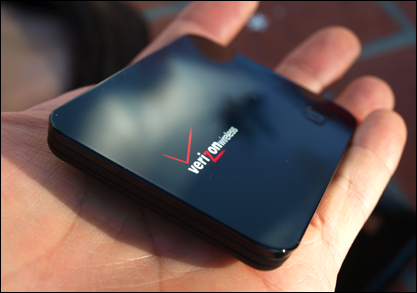
Verizon loaned me one of their mifi-2200 units and I have to say this is a fabulous gizmo, one that I’ll find out about buying when my loaner period is over. It’s that good.
As I said, the device is tiny: even in its little cloth pouch, it’s less than half the size of my Apple iPhone, and considerably lighter. It uses a micro-USB connector for both charging and direct connectivity (if you prefer to use it as a tethered cellular data network modem), so it’s also extremely portable. I know I’ve gotten into having it in my computer bag 24×7.
I tested this out on an Apple Mac system, a MacBook Pro running Mac OS X 10.6.1 (Snow Leopard), and it worked flawlessly.
Turn it on by pushing the single button on the device and within about 10-15 seconds it’s established a connection with the Verizon 3G network and “Verizon MIFI2200 A38B Secure” shows up on the normal Mac wifi menu.
Choose it and you’ll need to type in the twelve-digit password on the back of the device (once), and you’re online.
Performance-wise?
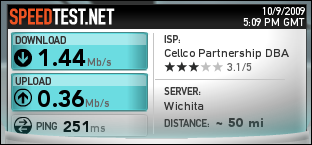
Not great, but pretty darn good for a device that will let you connect to the Internet just about anywhere you might be, from a hotel room to an airport to a house in the middle of suburbia.
Indeed, to test this, I took Amtrak from Denver to Chicago (and they say we reviewers aren’t dedicated!) and found that I was able to connect about 80% of the time, and that most of those connections were acceptably fast to surf the web without being aware I was using the cellular network. In more urban areas, it’s worked flawlessly even when my AT&T iPhone can’t find 3G coverage at all.
The Mifi-2200 is rated at about 4 hours of battery life, I found it to be a bit less, perhaps 3 hours or so, but still quite acceptable. After all, with a device this small it’s clear that they didn’t have space for a large battery. Since you can plug it in and use it while it’s charging, it’s quite acceptable. Better, bring the wall charger along and you can just plug-and-forget: it’s a perfectly acceptable wifi base station while charging too.
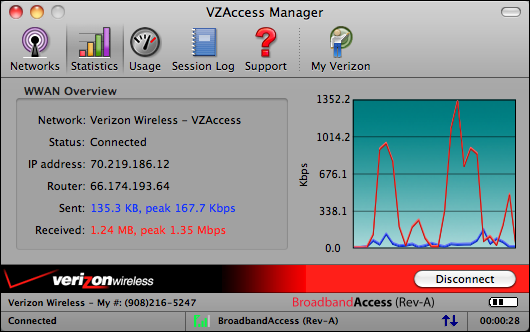
Verizon also includes a pretty crude little app called VZAccess Manager (a white-label version of Smith Micro’s QuickLink Mobile, I believe). The UI could do with a facelift, but it does have some cool stats you can view:
Perhaps the most important question with the Verizon Mifi-2200 is cost. According to Verizon [caveat: that link might require you’ve logged in to the site], the MIFI2200 Intelligent Mobile Hotspot costs $99 on a two-year contract, or $149 without it. Verizon mobile broadband plans range from $39.99/month (for 250MB of data usage) to $59.99 (for 5GB of data usage).
If you wanted the top plan and were buying the device, across two years it’d run a cool $1,538, but then again, if you are used to paying $12.99/night for Internet access in hotels and spend four or five days/week on the road, it’s about the same cost overall.
Finally, I appreciate Verizon giving me the chance to really put the MIFI2200 Intelligent Mobile Hotspot through its paces. It’s one of the few devices I’ve tested in the last year that has no downside I can think of. It’s tiny, light, fast, flexible, and dead simple to use.
Oh, no, that’s not right. I have one request: some sort of battery power indicator on the device itself. More than once I’ve flipped it on just to have it die 5-10 minutes later. Otherwise, flawless, and highly recommended.
I’m curious and I haven’t been able to find the answer anywhere else…
Can you use the MiFi as just as local access point, just to create a LAN? I mean, without having the 3G connection turned on?
Since the Verizon MiFi 2200 dies without much warning, I sometimes leave the charger plugged in. Is there any harm in leaving it plugged in 24/7 while using at home? We are in the boonies with no cable or DSL, so use the MiFi 2200 as our main internet connection.
I need a router that I can connect a ip camera to. Is there a router that I can connect the MiFi to?
I bought the Verizon MiFi after hearing Dave rave about it at a conference we both attended, and I agree with him – it’s a great tool.
One thing I really like, Dave mentioned in passing – the mifi gives you a secure connection to the Internet. I’m not a computer expert, but to me that sounds a lot safer than using the unsecure connection you get at hotels. So, on a recent trip, I used the MIFI in the hotels I stayed in even though most of them had free wifi available.
The one thing I do notice that I don’t like is that the mifi gets extremely hot if you use it in a closed space. (I left mine in my pocketbook one day so I wouldn’t forget it, and when I went to turn it off it was extremely hot to the touch.) If you leave out in the open, it gets kind of warm, but not really hot like it did in an enclosed space.
One mine, too, I’ve found that you don’t seem to get much warning when the battery is running out. The light does flash red, but it seemed like the device shut off just a couple of minutes later. Though, it could be that I just didn’t notice the light changing to red when it first did. So, when I am somewhere that I can plug it in, I use it that way.
As someone noted above, too, I have one laptop home that doesn’t see the signal. That one is about 6 or 7 years old. A notebook I bought about 4 years ago sees the signal just fine.
We recently bought one of these for senior exec travel, one of whom promptly took it home with him & hasn’t returned it yet. So I’m not extremely familiar with it, but according to the manual, the LED that serves as an on/off indicator is supposed to flash red when the unit is “critically low” on battery. Does this mean that it only flashes for that last minute or so? If so, definitely a flaw that should be fixed!
Dave,
We recently had an outage of our company’s T1 line for a week and we used one of these as an interim solution. We found the performance acceptable, but we found that not all of our machines could connect to it, especially some of our older laptops. We also found that the connection would drop throughout the day, which was a problem for some of our applications.
Of course, one could argue that you cannot expect this product to perform with the stability of a T1, or even a cable modem. We didn’t spend additional time diagnosing the reasons for these problems, especially once our T1 came back up.
All in all, we found that this helped us out of a jam, but it also came with its own difficulties.