
Between my work as a film critic and the time I spend working on computers, I really stare at screens a lot. I mean, probably upwards of ten hours each and every day. Then again, I surmise that you also spend a lot of time looking at screens, be they televisions, computer screens, or even a smartphone or other mobile device.
But screens haven’t really changed that much in the last ten to fifteen years. Sure, they’re bigger, but the core technology and, more importantly, the way that we relate to the display screen hasn’t changed much at all. We sit and look at the screen, be it 20-inches from our face while in an office or eight feet from a huge HD screen mounted on a wall. And there’s no privacy because there’s always a distance between the screen and your face.
Sony’s crack engineering team decided to see if they could change that and create an immersive headset that contained its own tiny screen, a screen that was so close to your eyes that it had the appearance of a 150-inch HD television screen. And, while they were at it, they added a second tiny screen (both high def OLED), 5.1 audio and a vivid 3D system.
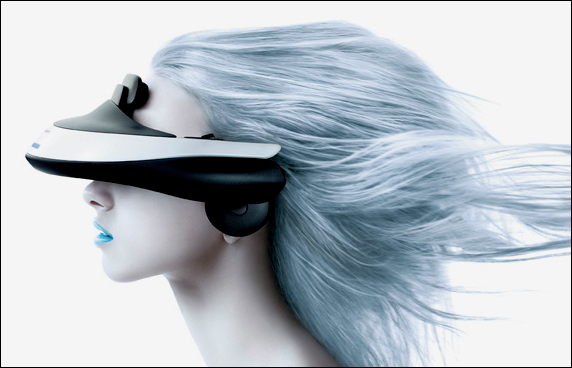
Enter the Sony HMZ-T1 Personal 3D Viewer, as shown on the model, above. Think of it as high-def goggles for any video content you’d like to enjoy in private. Sony sent us an HMZ-T1 to examine and try for a few weeks, and here’s what we found…
The first thing that is surprising about the HMZT1 is that in addition to the big googles, there’s also a video interface box required, one that has to be plugged into a local wall outlet, making the device unsuitable for portable use. Which is one of its great limitations because this would be so, so cool to have on an airplane flight as you lay back and enjoy full HD video and high quality stereo, even being fed from your iPod or iPad with the HDMI interface adapter available on the aftermarket. But it’s not an option.
For home or office use, however, that’s not a limitation, so the question really is how does the device work when hooked up to a Blu-Ray player, a cable box or a computer? And the answer is splendidly, with some reservations.
To test the Sony HMZ-T1, we hooked it up to a 3D Panasonic Blu-Ray player, fed data directly from the Comcast cable box into the device, and — using an HDMI interface adapter — a MacBook Pro computer.
The Blu-Ray player worked very well and the computer interface was terrific: it’s really nice to be able to edit a document or read an ebook or watch a movie on your personal headset, with high quality audio. The cable box didn’t work as well, which was disappointing because we were eager to try watching some HDTV sports, but while the video looked great, the audio was missing and even after checking in with Sony support, we couldn’t ascertain why it didn’t work properly.
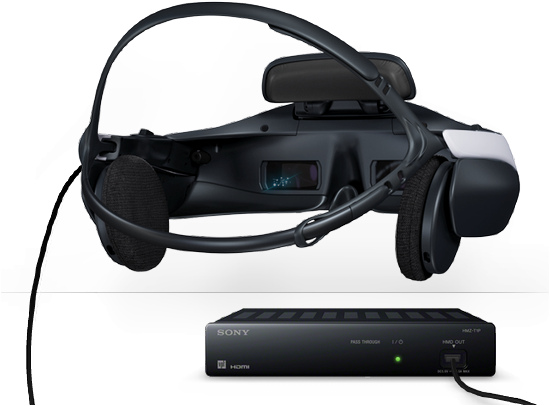
On the computer, we tested the headset by watching Rise of the Planet of the Apes and while it was an enjoyable experience, the headset is heavy and even with the many adjustments possible, I could never quite get the images to be perfectly aligned and crystal clear. The result: I could watch it for 10-15 minutes, but then got sidetracked trying to adjust it just a tiny bit more so it’d be clear and crisp.
Here’s how Sony describes the gizmo:
“Enjoy private screenings in jaw-dropping 2D or 3D HD and ear-pleasing 5.1-channel surround sound that simulates the feeling of being in your very own movie theater. Feel like you’re sitting 12 feet away from a 150″ screen and make getting into your game or watching your favorite movie an all-new adventure. Get not one, but two HD OLED displays which are known for outstanding brightness, contrast, color and clarity. Adjust forehead and headband straps for a fully customized fit designed for heads large and small. Keep the unit connected to your TV at all times — with HDMI® pass-through you don’t have to unplug it when not in use.”
With a retail price of $799 for the unit and everything you need to hook it up to your computer system (except an HDMI interface, if you need one), it’s a very interesting addition to a rather banal display market, but it’s also not for everyone. In fact, Sony recommends that it not be used by anyone under 15, so it’s not going to be the perfect holiday present for your fanatical tween gamer.
In summary, I really like the concept of the Sony HMZ-T1. It looks sleek, futuristic, the sound is gorgeous and the screens themselves are bright and vivid. I just couldn’t quite ever get it perfectly adjusted, which makes me feel that if you are interested in acquiring one of these, you’d be smart to try it on at a local Sony Store before you buy it. If it does fit, though, this is one amazing device. And if you’re an adult gamer? This’ll be one step closer to gaming nirvana. It’s that cool.