
I’m sick of the never-ending privacy changes at Facebook, frustrated that I have in good faith entered a ton of information about myself and my social circles, just to have them constantly tweak and fiddle things so that they can get more visibility and make more money, all while compromising my privacy. What’s up with that, Zuckerberg?? I’m done. How can I cancel, delete, erase, axe, kill my account?
I can totally sympathize with you. It’s the only site I know where I have to go through the privacy settings and make sure things haven’t “evolved” to leave my information, connections and data more exposed to either search engine spiders or the public than I want. Really, it’s pretty incredibly lame on their part in a society where people complain all the time about loss of privacy in the digital world.
That’s another topic, however, I suppose. :-\
If you are sure that you do want to delete your Facebook account then here’s how you do that.
Are you sure that’s what you want to do, however, rather than just going into the privacy settings and minimizing your exposure?
Okay, okay. Here are the steps…
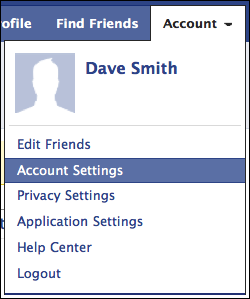
Go to “Account Settings”:
Once your there, scroll down and at the bottom you’ll find:

Click on the “deactivate” link on the right and you’ll see an exhaustive list of reasons why you might want to leave. They’re collecting data, obviously:

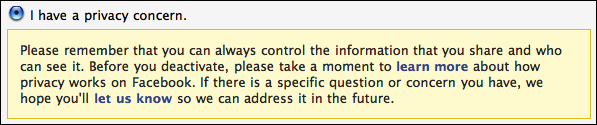
Sounds like your issue is about privacy, so if you choose “I have a privacy concern” you’ll find a little editorial commentary from the Facebook team:
A bit lower down you can also specify that people sending you friend invites (etc) will or won’t bother you:

Again, I’d say you should think carefully before you check this option, but if you really want to never have Facebook darken your email doorstep again, this is how to do it.
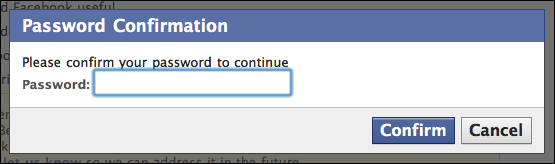
Either way, click on “Deactivate My Account” if you’re sure that’s what you want to do. Now it’s time to go through the gauntlet, starting with your password again (just in case someone sees you logged in and decides it’d be a great practical joke to delete your account):
Remembered your password? Good. Now prove you’re not a robot:

This CAPTCHA requires the words “Society” “darneder” (whatever that means). Enter those correctly and click on “Submit”.

Success! The account is officially shut down, removed, deleted and… um, just a sec. As you can see from the text above, Facebook doesn’t seem to delete your information, just deactivate the account. I’m guessing that’s not what you want, but it’s the best you can do.
By the way, a few minutes later you’ll get an email from Facebook about your deactivated Facebook account:

So now you know. That’s the best you can do, and it does effectively shut down your Facebook account and prevent anyone else from using your email address in the future.
I’m sick of facebook always showing up on my computer. Please cancel my account &any messages
on my facebook immediately!
Thank god for your help…this onesave me a lots of hours
Want to close down facebook, I have no use for it.
Hello I’m rommy,
I want to ask about how to cancel resetting password? because my wife forget for email of FB account was not available anymore when she want reset her password in FB,her ID for FB use meyndra@samsung.com. There is company email and my wife already resign 1 year a go from there. Thx a lot
i want the help of facebook team to disable my facebook account.i tryied many times to deactivate it my go back again .so i need your help not to reactivate my facebook again.thank you very much
hi. i want your help to deactivate my facebook account,because i tryied to deactivate it many times then i reactivate it again.i spend too much time on facebook and i want really to stop this i cant do anything else in my life.so please i need your help to disable my facebook thank you very much
Dear Sir / Madam,
I wasnt login the Facebook. These pages always gave that message ( Your account has been disabled by an administrator. If you have any questions or concerns, you can visit our FAQ page here) Please help me.
What can I do about that? Why did you cancel or disable my account?
Please open my account. If I did a wrong thing, I apologize you. I m waiting your suggests and soonest reply
Best regards
actually there is a way, here is the url for it
you can also access it by clicking account>help centre and then search for “Delete my account” it will not be the first result, just click on it and it will lead you to the same page
facebook is one of my prefered social networks i will only deactivate it if they don’t let me to use two accounts because i already have one with a user name that i don’t want to use to create my page on facebook so if i can’t change it or create another account i will deactivate it and create an other account with a new user name and create my webpage on facebook.
thank you dave i think this topic will help many people to change their accounts.
Thanks for this, I’m sure it’ll be useful to those who want to know how to delete their account…And for me if I wish to. Like people have said above, it is slightly creepy that facebook still keeps your information.. Hehe.
Good article,
Ellie
I might suggest that you first go in and remove any information you do not want associated with your identity. Facebook likely keeps the information somewhere anyway, but it is worth a try to at least take some association away from your account.
I have not deactivated my account yet, I have locked down all the privacy settings and removed all my contact, education and employment information. Again, I am sure Facebook probably has a database of all this information locked away somewhere. Thankfully I have not shared all of this type of information on Facebook, because Zuckerberg owns it forever.
Scary. Facebook doesn’t delete your information, but keeps it indefinitely. You can always reactivate your account and get back to your page.
Imagine the value of that database for advertisers or various other “evil” institutions. Astronomical.
Dare to resist the call of the ‘book!