
Ask Dave Taylor
  • Facebook
  • Instagram
  • Linkedin
  • Pinterest
  • Twitter
  • YouTube
  • Home
  • YouTube Channel
  • Most Popular
  • Newsletter!
  • Ask Me A Question
  • Meet Dave
  • Home
  • Linux Shell Script Programming
  • How can I convert map addresses into latitude longitude?

How can I convert map addresses into latitude longitude?

April 18, 2009 / Dave Taylor / Linux Shell Script Programming / 5 Comments

I’m trying to write a shell script that will accept a street address and output the latitude and longitude of that address, for geocache purposes. How can I do that?

  ★ ASKDAVETAYLOR WEEKLY EMAIL! ★
Guaranteed to Make you Smarter.
Click Here to Subscribe.

This is a pretty interesting problem because while there are a variety of ways you can ostensibly get your latitude and longitude for a specific address from somewhere like Google Maps, the data isn’t always accurate and it’s also often pretty darn hard to figure out.
Heck, one of the most common ways to get lat/long from a Google Map is to cut and paste a Javascript snippet into your browser address bar. Ugh.
Fortunately, after much digging around, I found that there’s not only a nice API for Yahoo Maps, but that there’s a lazy way you can access it via a shell script.
The key piece is the Yahoo Maps URL:

http://api.maps.yahoo.com/ajax/geocode?appid=onestep&qt=1&id=m&qs=

Let’s step through how it works, using an address you might have bumped into a few times in the past, and then I’ll show how it can be turned into a simple Linux or Unix shell script.

$ lynx -dump ‘http://api.maps.yahoo.com/ajax/geocode?appid=onestep&qt=1&id=m&qs=1600+pennsylvania+ave+washington+dc’
  YGeoCode.getMap({“GeoID”:”m”,”GeoAddress”:”1600 pennsylvania ave
washington
  dc”,”GeoPoint”:{“Lat”:38.89859,”Lon”:-77.035971},”GeoMID”:false,”succes
  s”:1},1);

The address is 1600 Pennsylvania Ave, Washington DC and I would like to think that everyone knows who lives there. Note that I’m using “lynx” to dump the result of that URL query to standard output and that the output is split across three lines.
The key data item here is GeoPoint because immediately following are the Lat and Lon values (in this case 38.89859 and -77.035971).
We can experimentally verify this by entering these two points into Google Maps too:
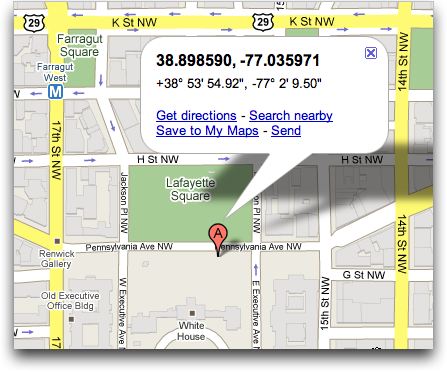
google maps white house

Yup, it’s the lat/long for the White House in Washington DC.
Back to the script, though. Using “lynx” (or “get” or “curl”) we now have a quick and easy way to convert a street address into a latitude / longitude pair. So there’s just stuff to wrap around it. For example, convert a simple address into a URL-friendly address. Pretty easy:

addr=”$(echo $1 | sed ‘s/ /+/g’)”

It’s a lazy way to accomplish this goal (e.g., turn spaces into “+” symbols), but let’s just keep moving and let it ride.
Next up, call the Yahoo API and save just the line that contains the GeoPoint data:

val=”$(lynx -dump “$converter$addr” | grep “GeoPoint” )”

Finally, we have the line that contains the lat/long we want. How do we extract just that data? With my favorite Linux command: “cut”:

lat=”$(echo $val | cut -d: -f3 | cut -d, -f1)”
long=”$(echo $val | cut -d: -f4 | cut -d\} -f1)”

Now we’ve got it! All that’s left is to output it:

echo “$long,$lat”

Put all the lines together and you now have a very simple command that does exactly what you seek:

$ sh geomap.sh “1600 pennsylvania ave, washington dc”
38.89859,-77.035971

Hope that helps you out. Oh, and assembling all the discrete lines into a script is a simple task “best left for the reader”. 🙂

Enjoy watching videos? I've got hundreds of lively and interesting product reviews you can enjoy with just a click. Please check 'em out: AskDaveTaylor Video Gallery.

About the Author: Dave Taylor has been involved with the online world since the early days of the Internet. Author of over 20 technical books, he runs the popular AskDaveTaylor.com tech help site. You can also find his gadget reviews on YouTube and chat with him on X as @DaveTaylor.

Let’s Stay In Touch!

Never miss a single article, review or tutorial here on AskDaveTaylor, sign up for my fun weekly newsletter!
Name: 
Your email address:*
Please enter all required fields
Correct invalid entries
No spam, ever. Promise. Powered by FeedBlitz
Please choose a color:
Starbucks coffee cup I do have a lot to say, and questions of my own for that matter, but first I'd like to say thank you, Dave, for all your helpful information by buying you a cup of coffee!

5 comments on “How can I convert map addresses into latitude longitude?”

  1. Chase says:
    April 18, 2014 at 11:31 am

    this makes no sense to me. i just got a Linux and im completely lost. youve made no attempt to tell me where i put the codes and how i even operate the terminal.
    please simplify this
    thanks.

    Reply
    • Dave Taylor says:
      April 19, 2014 at 12:45 am

      Sorry, Chase. You need to open up a “terminal” window (probably called “xterm” on your Linux system) and launch an editor like emacs or vi to type in the code, line by line. You can use a window-oriented editor, but it’s critical it’s saved in “plain text” or “ascii” or “text only” format to work. Then you can invoke it from the command line as you would any other command program. Hope that helps!

      Reply
  2. Peter says:
    May 5, 2011 at 2:44 am

    confusion:
    your first example displays lat to be equal to 38.89859 in one place and then after the line this line says echo “$long,$lat” to be equal to -77.035971 ! So which is it?
    Thanks for the script in any case. 😉

    Reply
  3. Harsh Shah says:
    February 18, 2010 at 10:32 am

    Wow…. what a great way to trick google maps… I really love you little sweet code.. that worked out amazingly…
    thank you so much for sharing this with us.
    Harsh

    Reply
  4. frogola says:
    September 30, 2009 at 9:17 am

    sweet! thanks dude!

    Reply

Leave a Reply Cancel reply

Your email address will not be published. Required fields are marked *

Search

Recent Posts

  • How to Change Your Default Web Browser in Windows
  • How to Check for Spam DM’s in Facebook Messenger
  • How to Automatically Close Your Garage Door with MyQ App
  • Best Time to Post on Facebook Business Pages?
  • How to Find and Remove Stray Android Background Apps

On Our YouTube Channel

Endless Cleaning with the Roborock Q10 S5+ Robot Vacuum & Mop

Cleer ARC 4 Open Ear Headphones: Ideal for Outdoors - DEMO & REVIEW

Categories

  • AdSense, AdWords, and PPC Help (106)
  • AI and ChatGPT Help (75)
  • Alexa, Kindle, and Nook Help (111)
  • Amazon, eBay, and Online Shopping Help (176)
  • Android Help (321)
  • Apple iPad Help (156)
  • Apple Watch & Smartwatch Help (63)
  • Articles, Tutorials, and Reviews (361)
  • Auto Tech Help (31)
  • Business Advice (202)
  • Chromebook & ChromeOS Help (80)
  • Computer & Internet Basics (847)
  • d) None of the Above (169)
  • Facebook Help (405)
  • Google, Chrome & Gmail Help (227)
  • HTML & Web Page Design (249)
  • Instagram, Bluesky & Threads Help (70)
  • iPhone & iOS Help (702)
  • iPod & MP3 Player Help (173)
  • LinkedIn Help (98)
  • Linux Help (182)
  • Linux Shell Script Programming (95)
  • Mac & MacOS Help (994)
  • Microsoft Outlook and Office 365 Help (53)
  • Most Popular (16)
  • PayPal Help (69)
  • Pinterest Help (58)
  • Reddit Help (24)
  • SEO & Marketing (83)
  • Spam, Scams & Security (130)
  • Trade Show News & Updates (23)
  • Video Game Tips (66)
  • Web Site Traffic Tips (62)
  • Windows PC Help (1,093)
  • Wordpress Help (207)
  • Writing and Publishing (72)
  • X/Twitter Help (233)
  • YouTube Help (54)
  • YouTube Video Reviews (159)
  • Zoom, Skype & Video Chat Help (80)

Archives

Social Connections:

Ask Dave Taylor


Follow Me on Pinterest
Follow me on Twitter
Follow me on LinkedIn
Follow me on Instagram


AskDaveTaylor on Facebook


microsoft insider mvp


This web site is for the purpose of disseminating information for educational purposes, free of charge, for the benefit of all visitors. We take great care to provide quality information. However, we do not guarantee, and accept no legal liability whatsoever arising from or connected to, the accuracy, reliability, currency or completeness of any material contained on this site or on any linked site. Further, please note that by submitting a question or comment you're agreeing to our terms of service, which are: you relinquish any subsequent rights of ownership to your material by submitting it on this site. Our lawyer says "Thanks for your cooperation."
© 2025 by Dave Taylor. "Ask Dave Taylor®" is a registered trademark of Intuitive Stories, LLC.
FTC Notice: If you buy products through links on this site we may receive a modest affiliate commission. This won’t affect the price you pay.
Privacy Policy - Terms and Conditions - Accessibility Policy - Humix Video Content
  • Home
  • YouTube Channel
  • Most Popular
  • Newsletter!
  • Ask Me A Question
  • Meet Dave