
I posted a status update on my Facebook timeline last night that was kinda dumb. By the time I woke up this morning, it spawned a big argument amongst my friends about racism in the NBA and I feel like it’d be wrong to just delete it, but I at least want to “mute” or ignore it so I don’t have to constantly be reminded of what’s going on and the fighting that’s going on. Is that possible?
Sounds like a good example of “don’t post drunk”, but then again, I’m making assumptions here and I probably shouldn’t. And racism in the NBA? Well, yeah, it’s a huge problem in all sports, professional or amateur.
I encountered a similar situation of my own recently, where I posted a review of the sci-fi thriller “Prometheus” and apparently lit the fire under two of my friends, who have been debating the film in increasingly passionate terms for the last few days. Fair enough, it’s an interesting discussion, but I really don’t want to be constantly reminded of their latest comments and feel like I constantly have new updates to check just to find they’re arguing over an obscure scene in a film. 🙂
So I figured out how to mute or ignore a Facebook timeline status update without actually deleting it and without quitting Facebook entirely (just kidding on that last part, though!)
Here’s the status update I put on my Facebook timeline:

Oddly, there are a number of options in this view, but the one we need is actually found on the page that just contains this update. How to get to it? Ah, you haven’t figured that out? Most people don’t seem to know that if you click on the time associated with a post, you get to the page that’s just that post or status update:
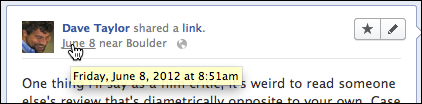
As you can see, if I click on “June 8” I’ll go to a page that has just this post and its comments, not a timeline with all sorts of other stuff present:
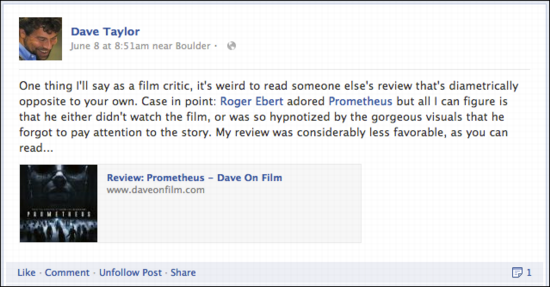
What you want is the “unfollow post” link that’s at the bottom. Here, let me zoom in:

Click on it and *poof* you’re no longer following the comments, likes and other activities that are related to this particular status update post. It changes too:

That’s it. You have just learned how to ignore a Facebook post that’s taken on a life of its own. Smart. Now about those late night comments…
What? You’re not a fan of Ask Dave Taylor on Facebook? Well, you can remedy that right now: “Like” Ask Dave Taylor on Facebook. Thanks!
Hi Dave,
I have been remiss in checking out your website since we met several months ago at a joint Tavern Uptown Meetup. Wow, I’ve discovered a goldmine of information and this post on ignoring Facebook conversations is great content for another site I am just building thinkupfacebook.com and it’s Fb partner Custom Fb Pages for Business.
I make an occasional comment on a political post and all of a sudden it’s General Hospital or Days of our Lives! Great tip Dave.
I’m looking forward to learning about your new e-Book for Pinterest. See you tonight.
How do i stop/remove commments on _other_ people’s posts?? I rarely have any interest in following the comments-arguments on posts from people that show up in my newsfeed. I don’t want to remove the original friend. I just don’t have any interest in the replies-comments from everyone else.
how to do that??
many thanks Dave
Great blog post and I was on my way elsewhere when I saw “Rather amazingly, there are no comments on this article yet.” That stopped me in my tracks and here I am…commenting.
I have MANY times wanted to stop following a conversation on FB. It’s very easy on Google+ but now, it is also very easy on FB.