
I’m just getting into Linux and am curious to see what version I’m running on various machines. Can you step me through the process of identifying Linux version, please?
First off, props to you for thinking out of the box and learning Linux. It’s good to know more than just Microsoft Windows and MacOS X for our modern world, and 10x if you’re involved in any sort of Web development or even run a Web site. While Windows and Mac might be on people’s desktops, it’s really a Linux world behind the scenes. In fact, there are estimates that a staggering 96% of the Web servers powering the top 1000 Web sites are running Linux. Impressive!
Since you’re running Ubuntu Linux you have a very nice and smartly designed user interface (called a “GUI” [graphical user interface] “WM” [window manager] in Linux parlance) which gives you a point and click option, but more generally whether you’re on a Linux, Unix or other ‘nix system, you can always count on the uname command.
Let’s have a closer look. First, the easy way; on Ubuntu click on the gear icon on the very top right:

As you can see, the top option is About This Computer (just like a Mac, eh?) so click to choose that. A window will pop up with all the information you desire:

As you can see, this particular system is running Ubuntu 16.04 LTS. LTS? Long Term Support, it’s a category of Ubuntu releases and is very stable. There’s more information but that’s the basic.
Now, open up an xterm and try both uname -v to just get the OS version and uname -a to get as much infomration about the system as it can report:

You can see that the command line yields a bit more detail: It’s not 16.04, it’s actually 16.04.1 that is running on this particular machine.
Armed with the uname command, let’s try it on a another computer, a Mac system from its own command line:
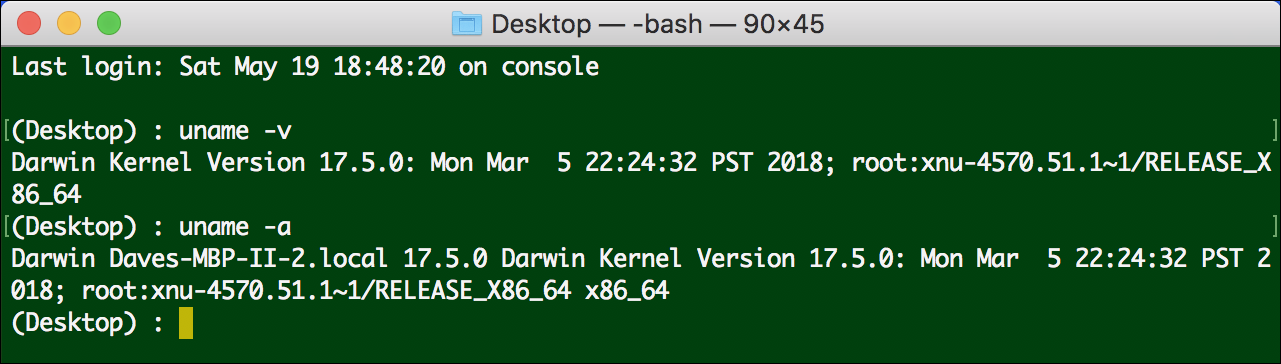
In this case, you can see that it’s running Darwin kernel version 17.5.0. Quite different from the MacOS X release number 10.13.4. Darwin, if you’re curious, is the Unix/Linux system upon which MacOS X is built and it’s darn powerful in its own right…
More importantly, now you can explore various Linux systems with the uname -a command and see that version numbers are all over the map!
Pro Tip: While we’re talking about Linux, why not check out our Linux help pages too?