
Ask Dave Taylor
  • Facebook
  • Instagram
  • Linkedin
  • Pinterest
  • Twitter
  • YouTube
  • Home
  • YouTube Channel
  • Most Popular
  • Newsletter!
  • Ask Me A Question
  • Meet Dave
  • Home
  • Facebook Help
  • How Can I Export My Contacts List from Facebook?

How Can I Export My Contacts List from Facebook?

January 16, 2021 / Dave Taylor / Facebook Help / 1 Comment

Given our current political climate, I wouldn’t be surprised if Facebook shut down my account and kicked me off the platform any day now. I don’t much care, other than I’d like a list of every one of my contacts before that happens. Is there a way to export my contacts list from Facebook?

  ★ ASKDAVETAYLOR WEEKLY EMAIL! ★
Guaranteed to Make you Smarter.
Click Here to Subscribe.

You’re correct that many social media sites are having to figure out how they can proceed given the occasionally fiery debates that they host between various site members. Obviously we as a society don’t want to have websites that center on threats of violence against anyone or exist to help angry people organize violent events. On the other hand, who gets to decide what is and isn’t acceptable speech? It’s a tricky problem.

Having said that, I think it’s much more common for Facebook to limit accounts then to actually kick people off the platform entirely. If you want to quit Facebook, however, it would still be entirely smart to export your contacts list and other personal data before you leave. If nothing else, it’ll help ensure you don’t have to reactivate your account in the future so you can log back in to grab the data and then “quit” Facebook again!

Fortunately, unlike a few years ago, Facebook has a lot of data export tools and lets you dial-in exactly what it is you want to export rather than just getting this massive chunk of photos, posts, comments, etc. In fact you can quite easily export just a list of your contacts. I’ll demonstrate how to do that, but be warned that you might be a bit disappointed in the results. Let’s have a look!

HOW TO EXPORT YOUR FACEBOOK CONTACTS

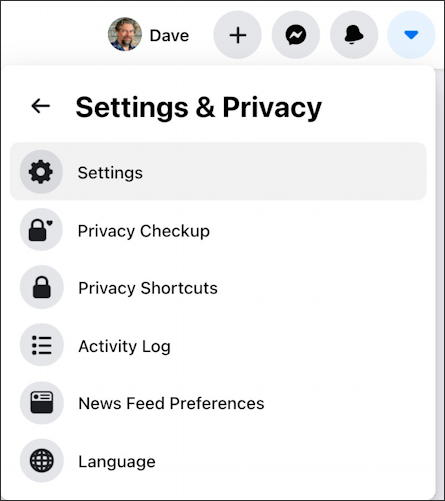
I’ll go through the steps with Facebook’s desktop interface. Log in to your Facebook account, then click on the tiny triangle on the top right and choose “Settings & Privacy“. You’ll then be in a menu that looks like this:
facebook fb export personal contacts list - settings menu

Before we go further, note “Privacy Checkup“. Definitely worth running occasionally to make sure you still have all your personal data set as you prefer.

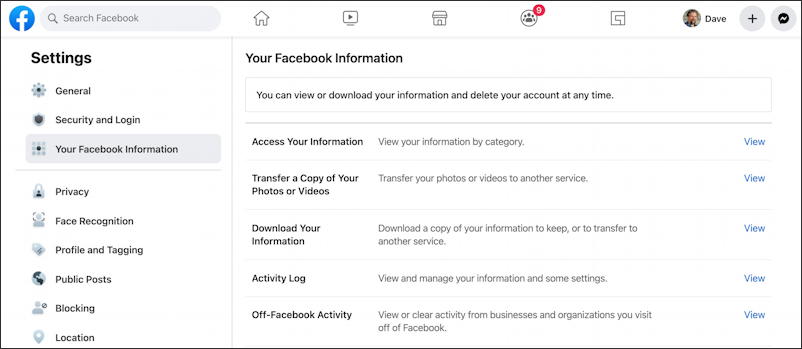
Ready to proceed? Choose “Settings” and you’ll be whisked off to an entirely different area on Facebook with a lot of settings and preferences:
facebook fb export personal contacts list - your facebook information settings privacy

Here you want to choose “Your Facebook Information” from the left side, then Download Your Information” on the right side, about halfway down.

Before we leave this page, however, notice a few really important settings you can access here: Face Recognition (did you know you were by default in Facebook’s facial recognition database and would be automatically tagged if you appear in a photo that anyone uploaded?) and Profile and Tagging. I encourage you to check both of those areas to ensure your account settings match your personal preferences for privacy.

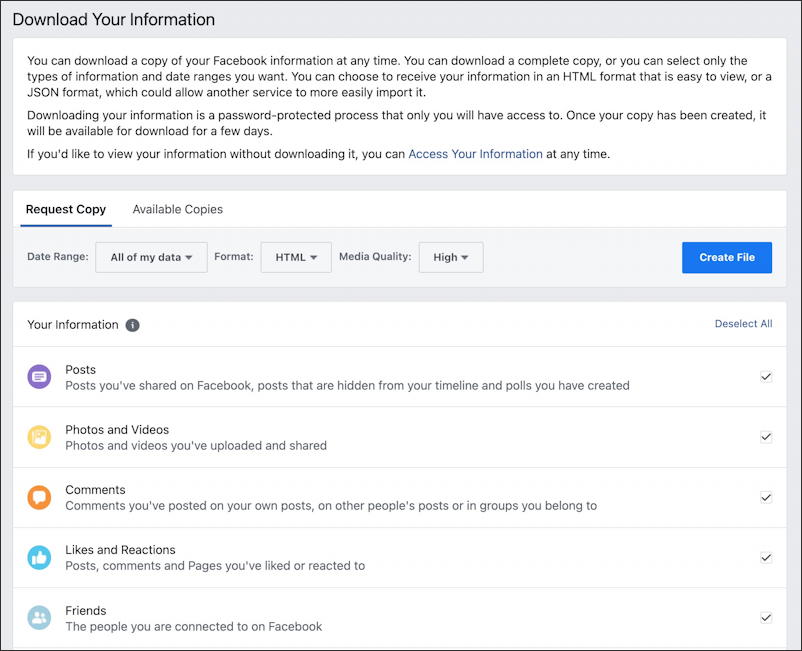
But… back to task. Click on “Download Your Information” and it explains what options you have:
facebook fb export personal contacts list - download your information

You can specify a date range for a data save, for example, if you just want to see what photos and videos you uploaded in the last six months, or you can proceed with the default settings and export everything you’ve ever done on Facebook. If you’re like me, that’s an enormous amount of data, so do proceed thoughtfully if you choose that option.

You can also just export your Facebook friends list by choosing “Deselect All” on the upper right then just choosing the checkbox adjacent to “Friends” (the last option shown in the image above) then click on “Create File“.

Now your first surprise: It’s not instant!

facebook fb export personal contacts list - building

In fact, when I ran this test, it took 24 hours for Facebook to build this export, which suggests that either a lot of people are busy exporting data or they have one old PC sitting in the broom closet managing these requests. 🙂

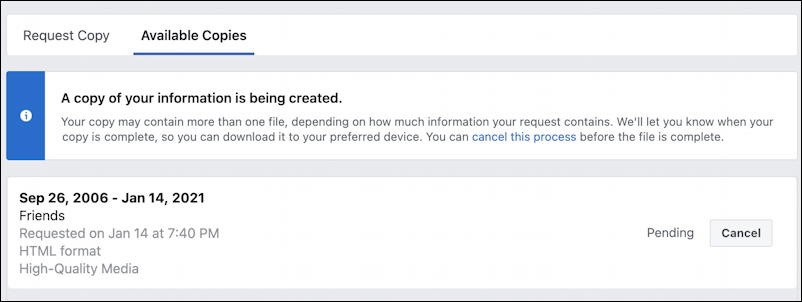
At any point while you’re waiting you can go to the same spot and check to see if the export’s ready to download or not by clicking on the “Available Copies” option:
facebook fb export personal contacts list - copy being created

Eventually you’ll get an email notification that the export is completed and ready to download and a little notice will show up in your Facebook Notifications window too:

your facebook information data export ready to download notification

This time when you go to “Available Copies” you’ll see a download link, unlike the Pending archive in the previous screen capture:
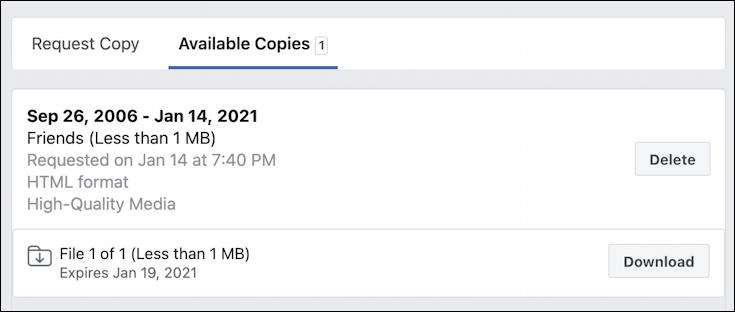
facebook fb export personal contacts list - download ready

A click on the “Download” link and you’ll find that you need to re-enter your password for security purposes…
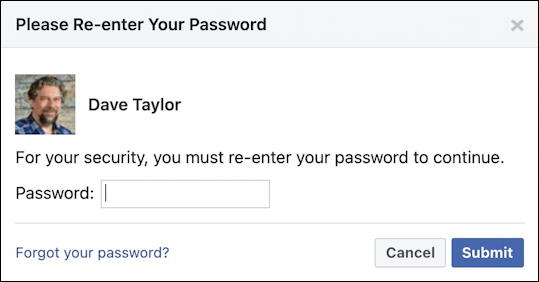
facebook fb export personal contacts list - re-enter password security

But then it’ll download!

At which point you’ll find that it’s not really very helpful; it’s an HTML Web page that basically just lists everyone’s name:
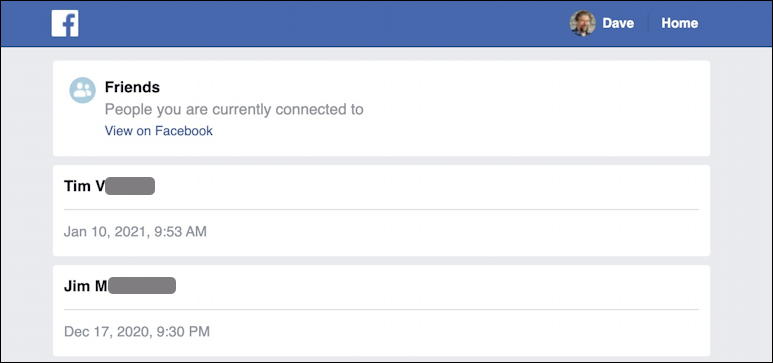
facebook fb export personal contacts list export html page

Honestly, it’s so unhelpful (maybe 1% of my own contacts have any other information at all, like an email address) that I almost think it’s Facebook’s way of saying You want an export? Ha! We’ll show you…

But at its most basic, it is a list of the names of everyone with whom you’re connected. Mission sort of accomplished. Good luck!

Pro Tip: I’ve been writing about Facebook since it first came online. Please check out my extensive Facebook help library for tons more useful tutorials while you’re visiting. And why not follow AskDaveTaylor on Facebook too, while you’re clicking? Thanks!

Enjoy watching videos? I've got hundreds of lively and interesting product reviews you can enjoy with just a click. Please check 'em out: AskDaveTaylor Video Gallery.

About the Author: Dave Taylor has been involved with the online world since the early days of the Internet. Author of over 20 technical books, he runs the popular AskDaveTaylor.com tech help site. You can also find his gadget reviews on YouTube and chat with him on X as @DaveTaylor.

Let’s Stay In Touch!

Never miss a single article, review or tutorial here on AskDaveTaylor, sign up for my fun weekly newsletter!
Name: 
Your email address:*
Please enter all required fields
Correct invalid entries
No spam, ever. Promise. Powered by FeedBlitz
Please choose a color:
Starbucks coffee cup I do have a lot to say, and questions of my own for that matter, but first I'd like to say thank you, Dave, for all your helpful information by buying you a cup of coffee!
export facebook data, facebook account backup, facebook contacts export, save facebook account

One comment on “How Can I Export My Contacts List from Facebook?”

  1. Mark G (Thornton CO) says:
    May 28, 2023 at 2:40 pm

    Excellent instructions, even with the interjected information I will have to brainmark for now since I have other tasks. Thank you!

    Reply

Leave a Reply Cancel reply

Your email address will not be published. Required fields are marked *

Search

Recent Posts

  • How to Update the Software on your KOBO Ebook Reader
  • How to Change Your Default Web Browser in Windows
  • How to Check for Spam DM’s in Facebook Messenger
  • How to Automatically Close Your Garage Door with MyQ App
  • Best Time to Post on Facebook Business Pages?

On Our YouTube Channel

Endless Cleaning with the Roborock Q10 S5+ Robot Vacuum & Mop

Cleer ARC 4 Open Ear Headphones: Ideal for Outdoors - DEMO & REVIEW

Categories

  • AdSense, AdWords, and PPC Help (106)
  • AI and ChatGPT Help (75)
  • Alexa, Kindle, and Nook Help (112)
  • Amazon, eBay, and Online Shopping Help (176)
  • Android Help (321)
  • Apple iPad Help (156)
  • Apple Watch & Smartwatch Help (63)
  • Articles, Tutorials, and Reviews (361)
  • Auto Tech Help (31)
  • Business Advice (202)
  • Chromebook & ChromeOS Help (80)
  • Computer & Internet Basics (847)
  • d) None of the Above (169)
  • Facebook Help (405)
  • Google, Chrome & Gmail Help (227)
  • HTML & Web Page Design (249)
  • Instagram, Bluesky & Threads Help (70)
  • iPhone & iOS Help (702)
  • iPod & MP3 Player Help (173)
  • LinkedIn Help (98)
  • Linux Help (182)
  • Linux Shell Script Programming (95)
  • Mac & MacOS Help (994)
  • Microsoft Outlook and Office 365 Help (53)
  • Most Popular (16)
  • PayPal Help (69)
  • Pinterest Help (58)
  • Reddit Help (24)
  • SEO & Marketing (83)
  • Spam, Scams & Security (130)
  • Trade Show News & Updates (23)
  • Video Game Tips (66)
  • Web Site Traffic Tips (62)
  • Windows PC Help (1,093)
  • Wordpress Help (207)
  • Writing and Publishing (72)
  • X/Twitter Help (233)
  • YouTube Help (54)
  • YouTube Video Reviews (159)
  • Zoom, Skype & Video Chat Help (80)

Archives

Social Connections:

Ask Dave Taylor


Follow Me on Pinterest
Follow me on Twitter
Follow me on LinkedIn
Follow me on Instagram


AskDaveTaylor on Facebook


microsoft insider mvp


This web site is for the purpose of disseminating information for educational purposes, free of charge, for the benefit of all visitors. We take great care to provide quality information. However, we do not guarantee, and accept no legal liability whatsoever arising from or connected to, the accuracy, reliability, currency or completeness of any material contained on this site or on any linked site. Further, please note that by submitting a question or comment you're agreeing to our terms of service, which are: you relinquish any subsequent rights of ownership to your material by submitting it on this site. Our lawyer says "Thanks for your cooperation."
© 2025 by Dave Taylor. "Ask Dave Taylor®" is a registered trademark of Intuitive Stories, LLC.
FTC Notice: If you buy products through links on this site we may receive a modest affiliate commission. This won’t affect the price you pay.
Privacy Policy - Terms and Conditions - Accessibility Policy - Humix Video Content
  • Home
  • YouTube Channel
  • Most Popular
  • Newsletter!
  • Ask Me A Question
  • Meet Dave