
Ask Dave Taylor
  • Facebook
  • Instagram
  • Linkedin
  • Pinterest
  • Twitter
  • YouTube
  • Home
  • YouTube Channel
  • Most Popular
  • Newsletter!
  • Ask Me A Question
  • Meet Dave
  • Home
  • Spam, Scams & Security
  • Does Facebook Email Users about Suspicious Logins?

Does Facebook Email Users about Suspicious Logins?

January 8, 2025 / Dave Taylor / Spam, Scams & Security / No Comments

I got an email from Facebook with the subject “someone tried to login to your account”, but I’m a bit skeptical that it’s legit. How can I tell if this message is really from Facebook or not?

  ★ ASKDAVETAYLOR WEEKLY EMAIL! ★
Guaranteed to Make you Smarter.
Click Here to Subscribe.

Props to you for being suspicious of an email security notification, whether it’s from Facebook, your bank, your school, or your city government. It is vanishingly rare that legit organizations send out notifications of this nature, and if they do nowadays it’s more likely to be a text message or notification from the company’s app itself. Of course, text messages can be spoofed or faked so you should be skeptical of those too. The basic approach for all of these is to ignore any links, phone numbers, or email addresses, and contact the company or organization directly instead.

But there are endless scams and so-called phishing attacks that are intended to trick you out of your login information so they can hijack your account. Based on that, my guess would be that if you’re skeptical enough to ask this question, odds are extremely good that what you received is indeed a scam. You can also apply some basic logic tests too; does it make sense? Is it internally consistent? Does the requested action make sense?

LOGGED IN TO MY FACEBOOK ACCOUNT??

To demonstrate how some of these scams work, let’s look at an email I got this morning with the subject of “Facebook: Someone tried to log in to your account”:
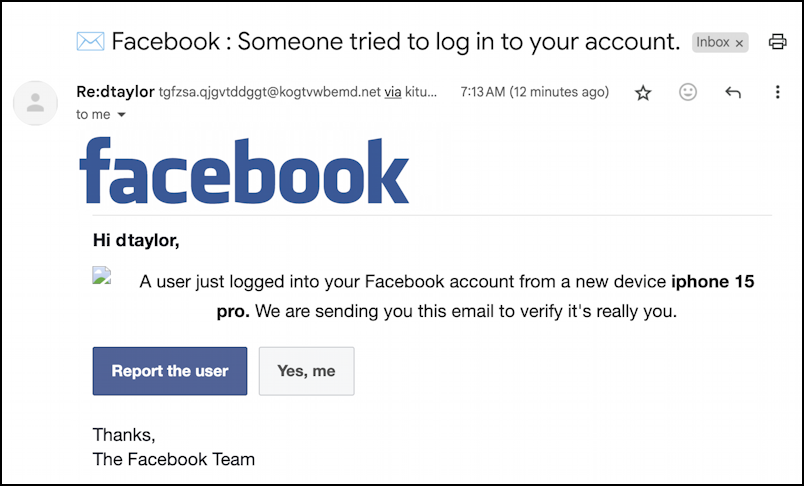
facebook phishing scam email - someone logged in?

At first glance it looks like it might be legit, right? But look more closely at the message because there are quite a few clues that it’s a scam message, not authentically from Facebook. For example, the subject warns someone “tried to” log in, but the message body says that someone “just logged in”. Two entirely different situations; why wouldn’t they be consistent?

Did you also notice that one of the graphics didn’t load, so there’s a broken image icon instead? It’s incredibly unlikely that an organization as big as Facebook would have such a rudimentary error.

What’s really damning, though, is if you look closely at the email sender, easily done by clicking on the tiny black triangle in Gmail (or equivalent “view sender” information in other email programs):
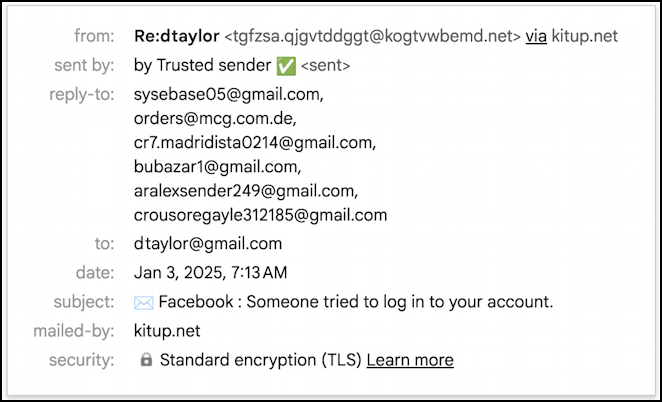
facebook phishing scam email - more details about the sender

Look at that From information! It looks like the cat ran across a computer keyboard more than any sort of legitimate organization or domain name. Then there’s that weird Reply-To information.

REPORT THE USER

This particular scam is utilizing what’s known as obfuscation to hide the address of the real scammer; by listing six email addresses, they hope to remain hidden behind one of those addresses. Odds are very good the other five are bogus and will fail, but the sixth? Maybe it really is the scammer…

Certainly, there is zero chance that any legitimate organization would ever use a message of this type.

But… let’s say you didn’t notice and clicked on either the “Report the User” button or the “Yes, me” button. Here’s what you would subsequently see:
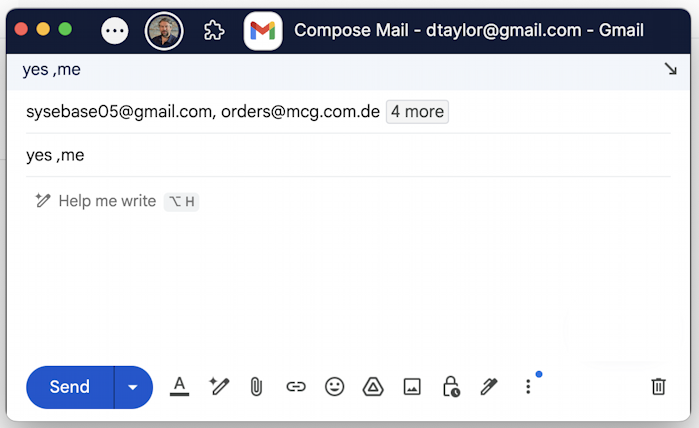
facebook phishing scam email - report the user email

Again, this should instantly create skepticism; why would Facebook want you to email a response to this ostensible account login warning? Click on “4 more” and it gets worse:
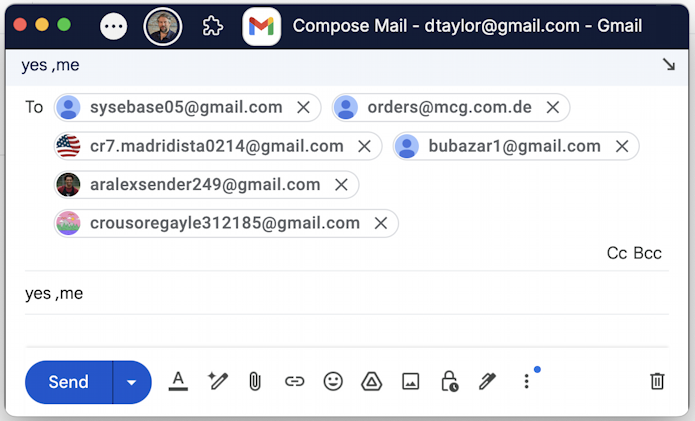
facebook phishing scam email - message response with all addresses shown

I would hope that even the most gullible person would at this point say “huh. that’s weird. I don’t know if it’s legit” and back away from the interaction. Indeed, you can even ask Gemini AI whether the message you received is legit or not. It gets it right:
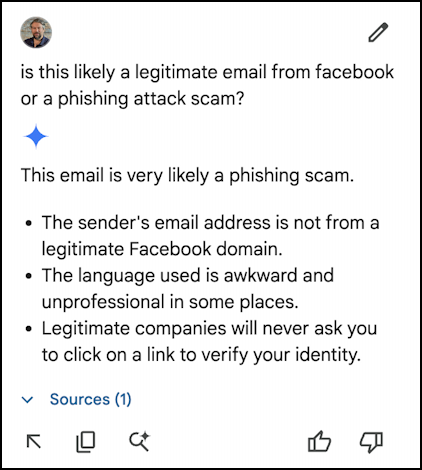
facebook phishing scam email - gemini analysis: legit or scam?

Next time you get a questionable message, try asking Gemini if it thinks that it’s legit or not. But don’t forget to follow your instincts too, they’re probably even a better filter.

CHECK YOUR FACEBOOK LOGINS

In this particular instance, it’s worth noting that you could also skip all buttons and links in the message and simply go to Facebook, log in, and check where you’re logged in to the system. From the home screen, go to Settings and Privacy and choose Activity Log. Here’s what I see:
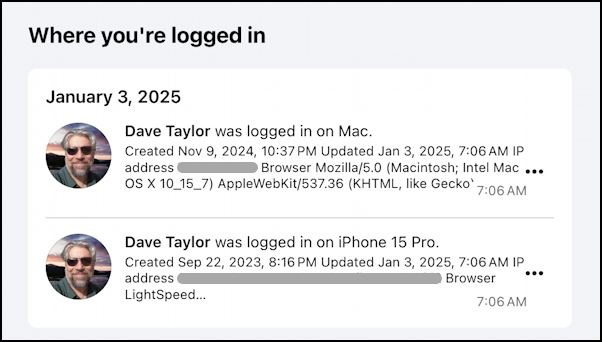
facebook settings and privacy > activity log

That’s exactly as I expect, a login on my computer, and a login on my phone. If there were any other logins shown, you could use the “•••” link to log ’em out:
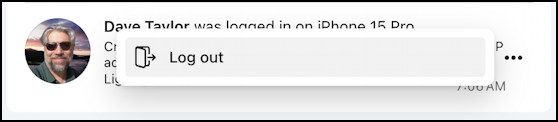
facebook settings and privacy > activity log - log unknown out

Anything suspicious? Log out everywhere but the current device, then change your password and enable two-factor authentication (and save the emergency access codes it shows). Now log in again and keep an eye on things. Trouble avoided. But not because of some highly questionable email. 🧐

Pro Tip: I’ve been writing about online scams for many years. Please check out my spam, scams and security help area while you’re visiting. Thanks!

Enjoy watching videos? I've got hundreds of lively and interesting product reviews you can enjoy with just a click. Please check 'em out: AskDaveTaylor Video Gallery.

About the Author: Dave Taylor has been involved with the online world since the early days of the Internet. Author of over 20 technical books, he runs the popular AskDaveTaylor.com tech help site. You can also find his gadget reviews on YouTube and chat with him on X as @DaveTaylor.

Let’s Stay In Touch!

Never miss a single article, review or tutorial here on AskDaveTaylor, sign up for my fun weekly newsletter!
Name: 
Your email address:*
Please enter all required fields
Correct invalid entries
No spam, ever. Promise. Powered by FeedBlitz
Please choose a color:
Starbucks coffee cup I do have a lot to say, and questions of my own for that matter, but first I'd like to say thank you, Dave, for all your helpful information by buying you a cup of coffee!
facebook phishing attack, facebook scam, facebook scam email

Leave a Reply Cancel reply

Your email address will not be published. Required fields are marked *

Search

Recent Posts

  • How to Update the Software on your KOBO Ebook Reader
  • How to Change Your Default Web Browser in Windows
  • How to Check for Spam DM’s in Facebook Messenger
  • How to Automatically Close Your Garage Door with MyQ App
  • Best Time to Post on Facebook Business Pages?

On Our YouTube Channel

Endless Cleaning with the Roborock Q10 S5+ Robot Vacuum & Mop

Cleer ARC 4 Open Ear Headphones: Ideal for Outdoors - DEMO & REVIEW

Categories

  • AdSense, AdWords, and PPC Help (106)
  • AI and ChatGPT Help (75)
  • Alexa, Kindle, and Nook Help (112)
  • Amazon, eBay, and Online Shopping Help (176)
  • Android Help (321)
  • Apple iPad Help (156)
  • Apple Watch & Smartwatch Help (63)
  • Articles, Tutorials, and Reviews (361)
  • Auto Tech Help (31)
  • Business Advice (202)
  • Chromebook & ChromeOS Help (80)
  • Computer & Internet Basics (847)
  • d) None of the Above (169)
  • Facebook Help (405)
  • Google, Chrome & Gmail Help (227)
  • HTML & Web Page Design (249)
  • Instagram, Bluesky & Threads Help (70)
  • iPhone & iOS Help (702)
  • iPod & MP3 Player Help (173)
  • LinkedIn Help (98)
  • Linux Help (182)
  • Linux Shell Script Programming (95)
  • Mac & MacOS Help (994)
  • Microsoft Outlook and Office 365 Help (53)
  • Most Popular (16)
  • PayPal Help (69)
  • Pinterest Help (58)
  • Reddit Help (24)
  • SEO & Marketing (83)
  • Spam, Scams & Security (130)
  • Trade Show News & Updates (23)
  • Video Game Tips (66)
  • Web Site Traffic Tips (62)
  • Windows PC Help (1,093)
  • Wordpress Help (207)
  • Writing and Publishing (72)
  • X/Twitter Help (233)
  • YouTube Help (54)
  • YouTube Video Reviews (159)
  • Zoom, Skype & Video Chat Help (80)

Archives

Social Connections:

Ask Dave Taylor


Follow Me on Pinterest
Follow me on Twitter
Follow me on LinkedIn
Follow me on Instagram


AskDaveTaylor on Facebook


microsoft insider mvp


This web site is for the purpose of disseminating information for educational purposes, free of charge, for the benefit of all visitors. We take great care to provide quality information. However, we do not guarantee, and accept no legal liability whatsoever arising from or connected to, the accuracy, reliability, currency or completeness of any material contained on this site or on any linked site. Further, please note that by submitting a question or comment you're agreeing to our terms of service, which are: you relinquish any subsequent rights of ownership to your material by submitting it on this site. Our lawyer says "Thanks for your cooperation."
© 2025 by Dave Taylor. "Ask Dave Taylor®" is a registered trademark of Intuitive Stories, LLC.
FTC Notice: If you buy products through links on this site we may receive a modest affiliate commission. This won’t affect the price you pay.
Privacy Policy - Terms and Conditions - Accessibility Policy - Humix Video Content
  • Home
  • YouTube Channel
  • Most Popular
  • Newsletter!
  • Ask Me A Question
  • Meet Dave