
Ask Dave Taylor
  • Facebook
  • Instagram
  • Linkedin
  • Pinterest
  • Twitter
  • YouTube
  • Home
  • YouTube Channel
  • Most Popular
  • Newsletter!
  • Ask Me A Question
  • Meet Dave
  • Home
  • Articles, Tutorials, and Reviews
  • Review: Autonomous SmartDesk 2 Standing Desk

Review: Autonomous SmartDesk 2 Standing Desk

April 28, 2017 / Dave Taylor / Articles, Tutorials, and Reviews / No Comments

Do you sit and sit all day, slumped in your supposedly ergonomic chair, then creak and have to stretch when you get up again? That’s because you need to be standing during the day! Enter the modern invention of The Standing Desk.

I review the Autonomous SmartDesk 2, one of the nicest and well made standing desks in the market…

  ★ ASKDAVETAYLOR WEEKLY EMAIL! ★
Guaranteed to Make you Smarter.
Click Here to Subscribe.

Not only have I not had an office desk for many years, I haven’t even had an office for years. Instead, I do what a lot of so-called digital nomads do and work at coffee shops or, sometimes, home workers do and grab a chair at the dinner table. Work well for an hour or so, but I often have to get up and stretch because the human body wasn’t really designed to be stuck in one position for hour after hour after hour.

That’s why standing desks have really caught on in many work communities, desks that are designed either at the optimal height for when you’re standing or have a mechanism that let you raise a typical desk so that you can stand and work in front of it. Lots of hacks, lots of goofy solutions with boxes and expanding computer stands, but really, what Autonomous offers with its second generation SmartDesk 2 is far, far superior and really will change how comfortable and productive you are, day in and day out.

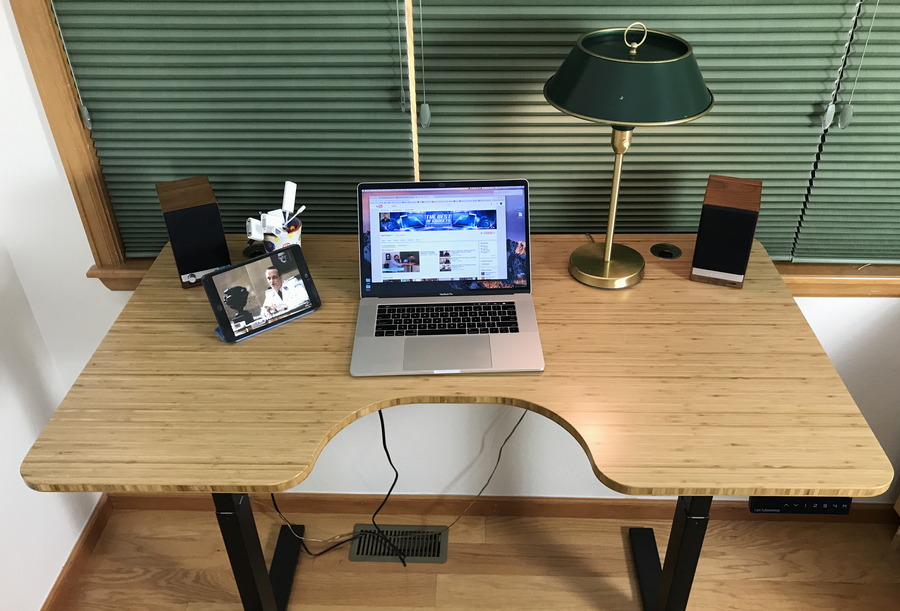
Let’s start with a photo of the Bamboo SmartDesk 2 standing desk with Ergo Desktop surface that the company sent along for us to review:
autonomous smart desk standing desk 2

As you can clearly see, it’s a lovely desk, with a smooth finish, quite strong (and heavy) and with plenty of space even with the 58-inch wide Ergo surface for a computer, an iPad (I’m using as a TV) and plenty of space to spread out notes, a book or even another tablet or smartphone. The “ergo” desk surface offers the cutout in the front which looks a bit weird, but is really convenient, particularly when standing. There are six different surface shapes, including one that’s almost two feet wider if you really need lots of space.

The lower cost version of the SmartDesk 2 has the height adjustment motor in one leg and uses a bar to raise or lower the other leg in parallel. The business version – what I reviewed – has two motors, one in each leg, and the result is a table that raises and lowers quickly and super smoothly, as shown in my video review:

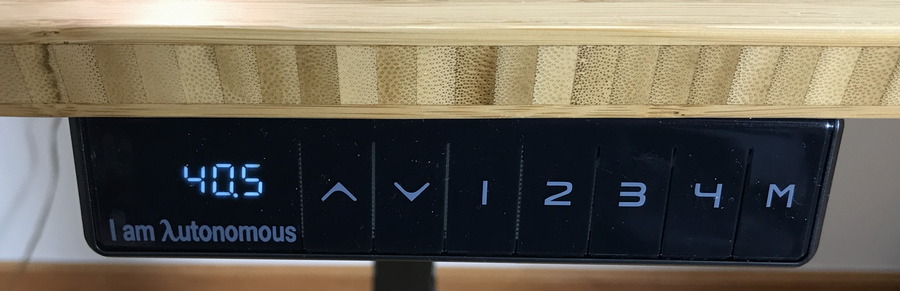
It’s really terrific in use, and the control panel offers four programmable presets, making it easy to adjust it to your perfect sitting and standing height:
autonomous smartdesk 2 control panel

Assembly was a bit tricky because the informational videos were focused on the lower end unit with the single motor, but once we decided to skip the instructions and just assemble it as made sense, we proceeded along at a good clip and two of us had it from box to fully assembled in 30 minutes or so.

The end result is really fantastic. The SmartDesk 2 has changed where and how I work, quite honestly, and the ability to stand up and even lean on the desk (it’s that stable and strong) is great, even if I decide after just a few minutes I want to sit down again to focus more on what I’m doing. If you’ve never tried a standing desk, I strongly recommend you check one out, and if you do, spring for one that has a motorized lift mechanism. It’s really worth it.

Autonomous SmartDesk 2 standing desk. Prices starting at $299. As reviewed: $549.

Disclosure: Autonomous sent us a desk for the purposes of this review. Which was really nice of ’em!

Enjoy watching videos? I've got hundreds of lively and interesting product reviews you can enjoy with just a click. Please check 'em out: AskDaveTaylor Video Gallery.

About the Author: Dave Taylor has been involved with the online world since the early days of the Internet. Author of over 20 technical books, he runs the popular AskDaveTaylor.com tech help site. You can also find his gadget reviews on YouTube and chat with him on X as @DaveTaylor.

Let’s Stay In Touch!

Never miss a single article, review or tutorial here on AskDaveTaylor, sign up for my fun weekly newsletter!
Name: 
Your email address:*
Please enter all required fields
Correct invalid entries
No spam, ever. Promise. Powered by FeedBlitz
Please choose a color:
Starbucks coffee cup I do have a lot to say, and questions of my own for that matter, but first I'd like to say thank you, Dave, for all your helpful information by buying you a cup of coffee!
adjustable desk, autonomous, autonomous smartdesk, desk height, ergonomic furniture, ergonomics, office furniture, smart desk, smartdesk 2, standing desk

Leave a Reply Cancel reply

Your email address will not be published. Required fields are marked *

Search

Recent Posts

  • How to Download Free Movies & TV Shows from The Internet Archive
  • How to Use Microsoft OneDrive on a Mac System
  • How to Update the Software on your KOBO Ebook Reader
  • How to Change Your Default Web Browser in Windows
  • How to Check for Spam DM’s in Facebook Messenger

On Our YouTube Channel

The NearHub Frames 10 Smart Photo Frame Really is SMART

Endless Cleaning with the Roborock Q10 S5+ Robot Vacuum & Mop

Categories

  • AdSense, AdWords, and PPC Help (106)
  • AI and ChatGPT Help (75)
  • Alexa, Kindle, and Nook Help (112)
  • Amazon, eBay, and Online Shopping Help (176)
  • Android Help (321)
  • Apple iPad Help (156)
  • Apple Watch & Smartwatch Help (63)
  • Articles, Tutorials, and Reviews (361)
  • Auto Tech Help (31)
  • Business Advice (202)
  • Chromebook & ChromeOS Help (80)
  • Computer & Internet Basics (848)
  • d) None of the Above (169)
  • Facebook Help (405)
  • Google, Chrome & Gmail Help (227)
  • HTML & Web Page Design (249)
  • Instagram, Bluesky & Threads Help (70)
  • iPhone & iOS Help (702)
  • iPod & MP3 Player Help (173)
  • LinkedIn Help (98)
  • Linux Help (182)
  • Linux Shell Script Programming (95)
  • Mac & MacOS Help (995)
  • Microsoft Outlook and Office 365 Help (53)
  • Most Popular (16)
  • PayPal Help (69)
  • Pinterest Help (58)
  • Reddit Help (24)
  • SEO & Marketing (83)
  • Spam, Scams & Security (130)
  • Trade Show News & Updates (23)
  • Video Game Tips (66)
  • Web Site Traffic Tips (62)
  • Windows PC Help (1,093)
  • Wordpress Help (207)
  • Writing and Publishing (72)
  • X/Twitter Help (233)
  • YouTube Help (54)
  • YouTube Video Reviews (159)
  • Zoom, Skype & Video Chat Help (80)

Archives

Social Connections:

Ask Dave Taylor


Follow Me on Pinterest
Follow me on Twitter
Follow me on LinkedIn
Follow me on Instagram


AskDaveTaylor on Facebook


microsoft insider mvp


This web site is for the purpose of disseminating information for educational purposes, free of charge, for the benefit of all visitors. We take great care to provide quality information. However, we do not guarantee, and accept no legal liability whatsoever arising from or connected to, the accuracy, reliability, currency or completeness of any material contained on this site or on any linked site. Further, please note that by submitting a question or comment you're agreeing to our terms of service, which are: you relinquish any subsequent rights of ownership to your material by submitting it on this site. Our lawyer says "Thanks for your cooperation."
© 2025 by Dave Taylor. "Ask Dave Taylor®" is a registered trademark of Intuitive Stories, LLC.
FTC Notice: If you buy products through links on this site we may receive a modest affiliate commission. This won’t affect the price you pay.
Privacy Policy - Terms and Conditions - Accessibility Policy - Humix Video Content
  • Home
  • YouTube Channel
  • Most Popular
  • Newsletter!
  • Ask Me A Question
  • Meet Dave