
Is there a single way to update all of my Mac apps? They’re not all from the App Store, however, so I don’t know how to proceed other than to use “Check for Updates” in every single app. There’s a better way, right?? I mean, this *is* a Mac…
You would think that there would be a single unified solution to keep all your apps and utilities updated on a Mac system, but the unfortunate reality is that there isn’t. In fact, it’s about as chaotic as it can be with some apps checking for updates themselves, some apps working with the App Store, and some just leaving it up to you to ensure that they’re updated, even if you haven’t run them for years. There are some solutions and some utilities that can help, but they don’t encompass every single app on your Mac, so the unfortunate reality is that the onus is on you to ensure all your apps are current.
The apps that I use the most on my own Mac tend to keep themselves updated, which works out, but the challenge is really those that I use once in the proverbial blue moon. A fair question at this point is whether it’s important to keep your apps updated at all, and the answer is that it depends. If it’s something like your Web browser where you’re using it for banking transactions and other confidential tasks, yes, ensuring that it’s always up-to-date is darn important. If it’s a game you enjoyed last year but haven’t played since, that’s probably less important, even if the update is a bug fix that includes unspecified security improvements.
Shortcuts: App Store | Check for Updates | Updater Software
As a general rule, I say that keeping things updated is important for the smooth running of your computer. Hopefully, you know how to update MacOS itself: Just go to System Settings > General > Software Update to see if there’s an update to the operating system. This can also include a very limited number of Apple applications and utilities too, but not all. So let’s jump in!
STEP ONE: THE APP STORE
Some Mac apps come from Apple’s App Store, and those are perhaps the easiest to update. Just launch “App Store” and click on the “Updates” option on the left side:
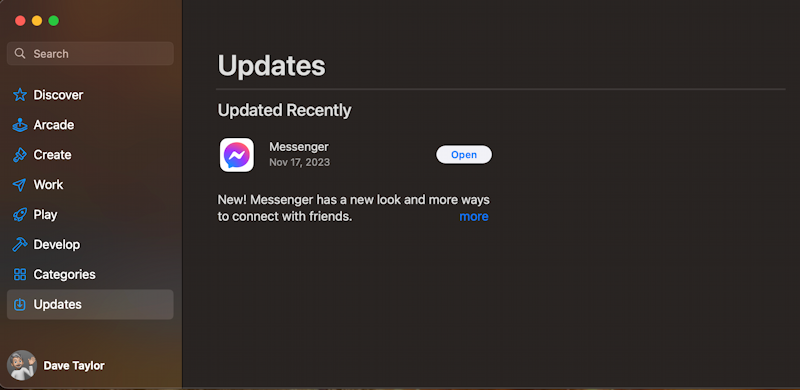
If there are any pending updates, it’ll be shown on this screen. You can see that my most recent app update (through the App Store) was Facebook Messenger.
Curious about what programs and apps you’ve downloaded from the App Store? Click on your account name in the lower left and it’ll show you both those you have installed and those that you have installed at some point on other Mac systems:
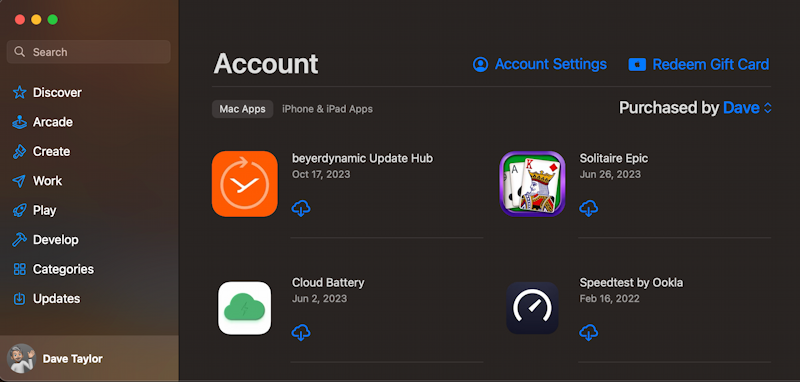
The cloud icon with the arrow denotes that it’s an app that I don’t have on this particular Mac system but have installed on a different Mac at some point in the past. Yes, I like solitaire games! 🙂
So that covers both MacOS itself (through System Settings) and the big Mac apps that are from the App Store, but what about all the other programs on your computer?
STEP TWO: CHECK APPS FOR UPDATES
Programs that you use regularly can automatically check for updates and notify you when there’s one to download and apply, but many programs also have a “Check for Updates” feature. For example, in the popular Zoom app:
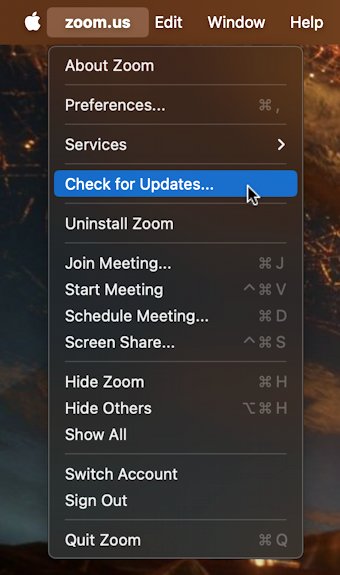
Zoom is an interesting program because they update it quite frequently, about every two weeks. As a frequent Zoom user, I’ve learned to use the Zoom.us > Check for Updates… feature every time I’m about to join a meeting. In this instance, rather surprisingly, there’s no update available:

By the time you read this I’m sure that 5.16.10 is going to be replaced with a newer version, however!
Some programs make it a bit convoluted to find their Check for Update feature, unfortunately. Google Chrome, for example, has an extremely subtle indicator that there’s an available update, but you can go to “•••” > Help > About Google Chrome (or use the shortcut chrome://settings/help) and it’ll show if there’s an update.
STEP THREE: MAC UPDATE APPLICATIONS
There are also some applications for your Mac that can help you keep the other software on your computer updated. I’m a fan of the utility CleanMyMac X and it includes a handy Updater feature. Click on “Updater” and it’ll scan your computer and highlight every app that has an update:
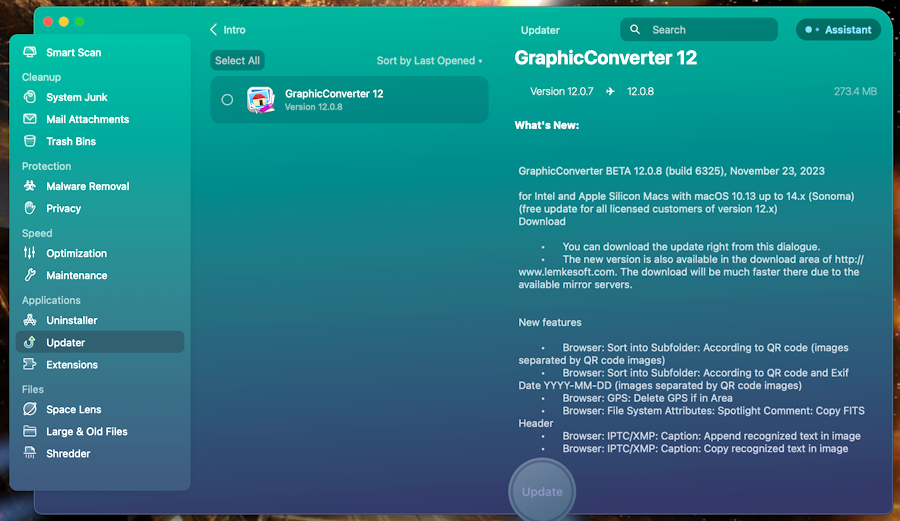
In this instance, it’s only GraphicConverter that has an available update from the list of apps and programs that it checks. Read that last phrase again; it’s not able to check each and every program on my Mac system, just a known subset. This means that it’s helpful, but it’s not sufficient. Worse, in this instance the update is a beta release, meaning that it’s only for testers, but CleanMyMac X doesn’t differentiate between regular software releases and beta releases.
Another program that’s worth considering is MacUpdater, an app designed specifically for this task. It can flag outdated software without a license, but if you pay the modest license fee ($14.99 for a lifetime license) it will actually do the updates too.
When I run MacUpdater, here’s what it reports:
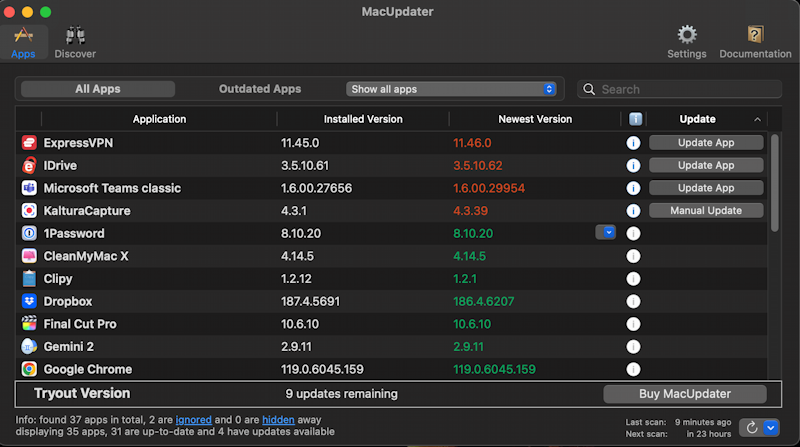
Notice that if you don’t pay for a license, you can perform 10 updates. Click on “Buy MacUpdater” to solve that problem, or use it simply to flag what needs updates, then manually updating the programs one by one. Some might be fairly unimportant updates, by the way, like iDrive, which increments from 3.5.10.61 to 3.5.10.62. My guess: Typo in a message or misspelled comment. 🙂
More significantly, notice how CleanMyMac X and MacUpdater report different software as being out of date. This means that if you really want to have everything as updated as possible, you’ll need to go through all the steps outlined here. Tedious, I know. But still better than encountering a major bug that loses data, corrupts files, or infects your computer.
Give ’em all a try, and good luck to you! I go through this rigamarole about every 2-3 weeks, if you’re curious, but I really like everything to be running its latest versions!
Pro Tip: I’ve been writing about MacOS since the first release and have hundreds of helpful tutorials here on the site. Please check out my Mac help library for lots more useful content while you’re here!