
Reddit has a really cool feature where people can indicate certain information they’re sharing is a spoiler. The result is that it’s covered by a black box and unreadable unless the cursor is moved over that specific region of the page. Very nice! How can I do that on my own Web pages?
In the earliest days of the Web, we had hypertext markup language, HTML. Rudimentary, but it let you have big text, italics, and even change colors as needed. Then cascading style sheets (CSS) came along and added an enormous amount of power to layout and Web page functionality. Coupled with JavaScript, it brought the Web to life and we definitely haven’t looked back since with HTML 5.0 and all the very latest improvements.
But sometimes old school still wins the day. There’s something very straightforward and elegant about how Reddit lets you denote spoilers and it does look exactly like the black redaction marks obscuring sensitive information from government documents too. You can see that used to great effect in the opening credits to the 2014 film Godzilla, for example.
There are fancy solutions, but the simplest is a combination of HTML and CSS. Let’s start by seeing how content appears when it’s redacted…
REDACTED SPOILER TEXT ON A WEB PAGE
Imagine you’ve come to a film review I’ve written (as it happens, I do write film reviews over on my PlanetDave site, but that’s another story) and there’s some info I don’t want to be visible by default. Perhaps it looks like this:
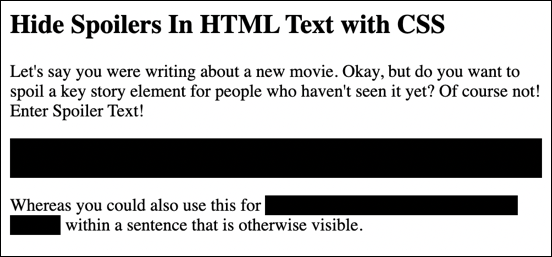
In the above you can see that the entire second paragraph is redacted, as is a short passage in the third paragraph. Move the cursor directly over one of these black portions and it magically appears, highlighted!
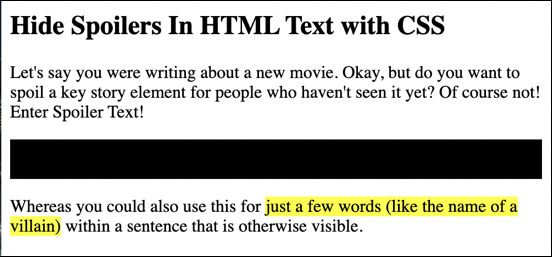
Reddit doesn’t use the yellow highlighting, of course, but it’s the same basic idea. Key to realize here is that what’s being manipulated is the background color of the specific named CSS container.
DEFINING TEXT TO BE HIDDEN (REDACTED) IN HTML
Lifting up the hood of this page, the HTML itself is straightforward enough; any that should be obscured is simply denoted by the addition of class=”spoiler-text” in the appropriate spot:
<body>
<h2>Hide Spoilers In HTML Text with CSS</h2>
<p>Let's say you were writing about a new movie. Okay, but do you want to spoil a key
story element for people who haven't seen it yet? Of course not! Enter Spoiler Text!
</p>
<p class="spoiler-text">
This is a paragraph of spoiler info that is hidden unless the cursor is hovering over it.
</p>
<p>Whereas you could also use this for <span class="spoiler-text">just a few words (like the
name of a villain)</span> within a sentence that is otherwise visible.
</p>
</body>
That’s the easy part. Notice that it can be added as part of an existing HTML element like <p> for a paragraph, but you can also create a <span> element if you just want it to apply to a word or phrase, as desired.
Easily done as you type, right? But the real action is at the top of the page…
ADDING CSS TO ENABLE SPOILER TEXT FUNCTIONALITY
First off, to add CSS to an HTML page, you need a well-organized page. I recommend the full code of <html><head></head><body></body></html>. The <title> and similar go in the <head></head> block, and all of the content of the page goes between <body> and </body>. Hopefully you already do that!
With that structure, you can add blocks of CSS instructions in the HEAD by wrapping them thusly:
<style type= "text/css" title="styleid" media="all">
CSS style information
</style>
This leads to the question of uh, okay, so what IS the CSS style I need to use?
The CSS code for the functionality you seek is broken into a block that describes the default style and appearance of any text that’s within a spoiler-text class block, and the hover functionality. Here’s the first section:
.spoiler-text {
  background: black;
}
Then the actual section that is invoked when someone changes focus by invoking the “hover” event:
.spoiler-text:hover,
.spoiler-text:focus {
  background: yellow;
}
This is all rudimentary, but it will offer the functionality you seek. Don’t want the background to be yellow when the text’s visible? Change “yellow” to “white” in the second CSS code section.
MAKING THINGS A BIT FANCIER
To make it a bit slicker, you can change the cursor shape when someone hovers over redacted information, and even change from a stark black to yellow switch to a more leisurely transition that looks a bit more sophisticated. Both of these are reflected in this more advanced code block:
.spoiler-text {
  background: black;
  cursor: help;
  transition: background 0.3s ease 0.2s, color 0.2s ease 0.25s;
}
We’ve added two things, “cursor”, and “transition”. The cursor change is pretty straightforward: A “help” cursor is a question mark symbol. The “transition” is more complicated, however, and is part of the very latest wave of CSS improvements. It basically is a shorthand for specifying four different parameters: transition-property, transition-duration, transition-timing-function, and transition-delay.
Explaining it fully is beyond the scope of this tutorial, but I’ll note that we specify things that should change (like background) and how quickly that should occur (“0.3s” or 0.3 seconds). What’s “ease”? Here’s how it’s defined in the specification:
ease - specifies a transition effect with a slow start, then fast, then end slowly (this is default)
The good news is that you can safely just copy and paste what I have and experiment with it to get just the transition you like. That should get you going with spoiler text on your Web pages. Have fun!
Pro Tip: I’ve been writing about HTML and CSS since the dawn of the Web. Please do check out my extensive HTML and CSS help tutorial library here on the site for you to check out while you’re visiting too. Thanks!
Hiding and redacting are two different things. What you show here is simply hiding: the viewer can select the underlying text, thereby exposing the information.
Redacting renders the underlying content unexposable, and uncopyable.
I would suggest removing mention of redact/redacting from this article, including the title, so as to not mislead readers into thinking their data is safe if they publish their own webpages using the hiding technique you describe here.
I think you’re being pedantic about redaction. 🤓