
I pre-purchased an album from a favorite artist of mine and while Apple emailed me that it’s available, when i go into iTunes, it’s not in my library. How do I download it?
I’ve had the same thing happen, where I enthusiastically purchase a new album from my favorite artist, or an original motion picture soundtrack from a favorite composer, but while I get the notification on my iPhone or computer, the music doesn’t show up in iTunes without me having to jump through some hoops.
You can make some changes to your iTunes configuration so that in the future it will automatically download content that becomes available after the fact, but that doesn’t solve the problem right now, does it? Fortunately I had exactly the same thing when I pre-purchased the London Has Fallen Original Motion Picture Soundtrack. Here’s what I did…
First off, here’s the email I got from Apple:
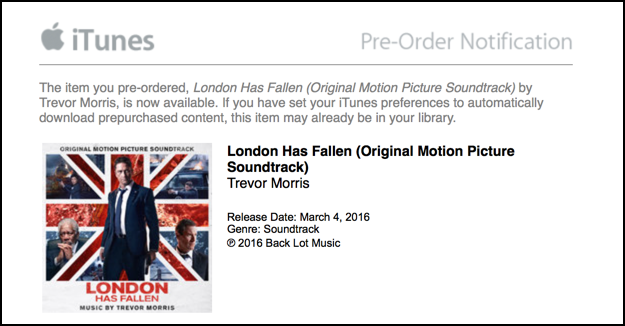
You can see “this item may already be in your library”, but what if it’s not?
Switch into iTunes, and let’s do a quick search to confirm it’s not actually already there. This is easily done by typing in the name of the album or other content you were supposed to have download. In my case, “london has fallen”:
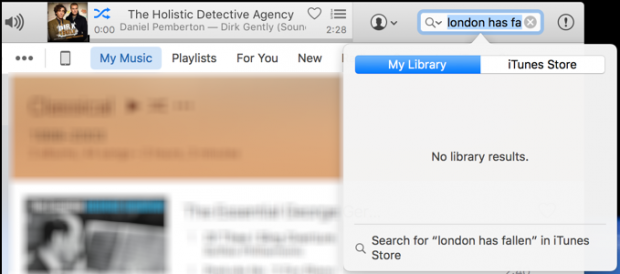
Nothing. Not good!
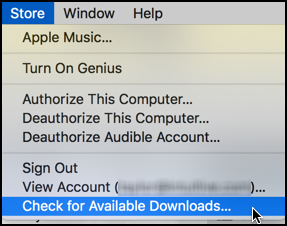
The good news is that it’s really easy to grab the missing download, just go to Store > Check for Available Downloads, as you can see:
Once you do that, the download will start right up, which you can confirm in the Activity Window:
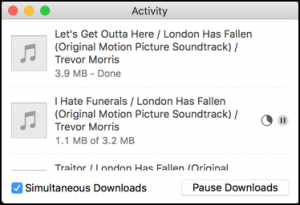
You can see that the first track, “Let’s Get Outta Here”, has already downloaded, and “I Hate Funerals” is in process.
Once it’s all done, a search for the soundtrack reveals very different results:
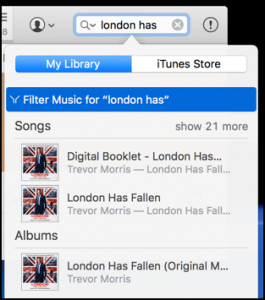
And, finally, if you want to change things for the next pre-purchase, go into iTunes > Preferences and click on ‘Store’. Then you can see what to do, just focus on “Automatic Downloads”:
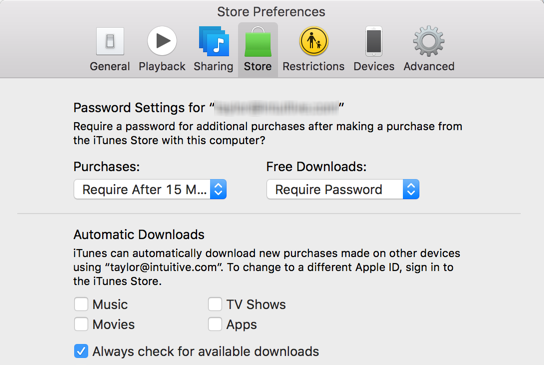
So that’s it. Now hopefully you also have your new music to enjoy from Apple iTunes Music.