
I switched themes on my Windows 8 laptop and I’m really liking the new racecar theme, but now I get an engine revving noise every time I start a new app or a new window opens. Driving me crazy! How do I turn off theme audio sound effects in Win8?
Considering that the majority of Microsoft’s business comes from enterprise customers, it’s a real surprise that so many of the Windows themes include sounds and audio effects. I know exactly what you’re talking about, though, because when I switched to a tropical beaches theme, suddenly I’d be hearing the sound of an ocean wave breaking on the shore every time I launched a program. Cute the first time, mildly amusing the tenth, but by the hundredth time? Not so much.
As with so much in Windows 8, the fast way to fix it is to use the search charm. Honestly, I don’t really even navigate through the Settings menu any more because Microsoft did such a great job of integrating system tasks into the search results. (still waiting for that to show up in Mac OS X, actually).
In this instance, just do a search for “theme” and see what shows up:
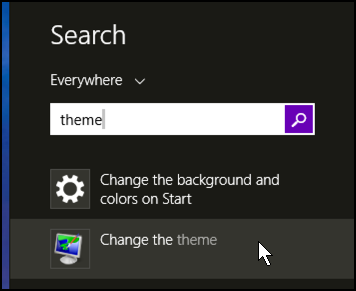
There’s what we want, as match #2: “Change the theme”. How easy is that?
Click on “Change the theme” and the Personalization window opens up, ready to modify:

Look along the bottom row where it shows “Sounds” as one of the choices.
Got it? Click on it to get to the Sound Theme personalization area:

One thing to note immediately is that here’s where you can disable the Windows Startup sound if you’d like to stop that incessant chime every time you boot!
You can also fine tune what has a sound associated with it on a per-event basis. Maybe you like the race car sounds when you start up the system and just want to disable the window opening sound? Scroll down to find the appropriate program event and click on the little speaker icon to its left.
Or you can just mute the entire sound theme at once:

Yes, I choose “No Sounds” on mine because while I love the visual appearance of the seashore theme, I really don’t like any audio associated with actions on my computer. Nice and quiet works just fine for me.
A click on “Apply” to set the change and…
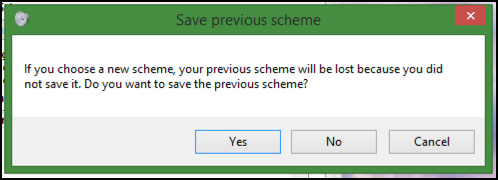
Ah heck, do you want to? In my case, I just tweak the screensavers after I pick a theme, so my response was “No”. You might make a different choice!
To confirm it worked, the main Personalization window should now display this along the bottom:

No Sounds. Is good.
Done.