
Criminals are constantly trying to separate us from our account and personal financial information. That’s not news. Usually what they do is pretty lame, but sometimes it can be surprisingly well crafted. Like a notice I got over the weekend from “Wells Fargo Bank”…
As soon as we started to trust the Internet and share personal information, it became clear to crooks that if they could somehow trick us into sharing that information with them, they could use it to purchase things, apply for loans, get new credit cards, and much worse. The price of our online system is vigilance, and sometimes it’s easy to let that slip and inadvertently come close to giving them just the information they want.
I bank at Wells Fargo Bank and have done for many years, and this weekend I received an email from the bank about an overseas ATM transaction that I knew I hadn’t made. Had I been scammed? Had someone actually taken my ATM information and used it in a foreign country to tap into my account?
Here’s the email as received:
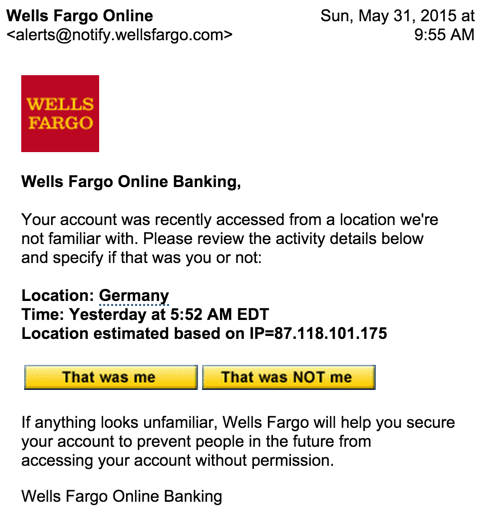
Looks legit and because the sender’s email address was spoofed, mail from “@notify.wellsfargo.com” automatically is moved into my “Banking” folder, giving it an additional air of legitimacy.
Still, banks don’t just give you a button to click saying “not my transaction” and Wells is better than most with invitations to log in then use the site’s secure email facility for communications, not just regular email like this.
Moving my cursor over the button reveals the problem:

It’s a bit hard to read, but the link would actually take me to fec.org.au, which turns out to be the Freemantle Education Centre in Australia, of all odd places. Australia? A “.org”? That’s not the Wells Fargo site!
Here’s where it gets interesting. A smart, skeptical person would immediately say “Ha! Gotcha! Darn $#@$# Scammer!” and delete the email. But I decided to click on the button instead…
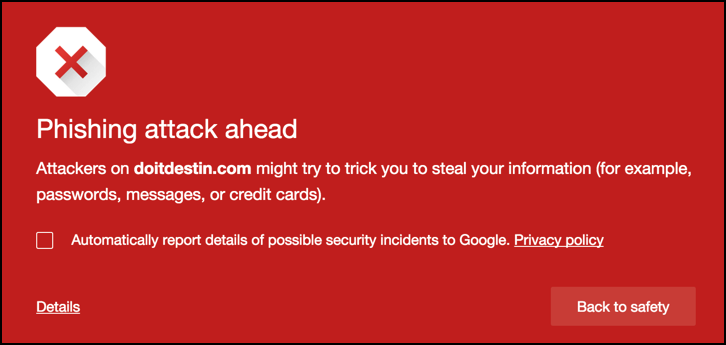
First off, it’s great that Google Chrome automatically detects that there’s a dangerous destination ahead and warns me. Again, any rational person clicks “Back to safety” and they’re done. But I continued forward anyway…
Oh, and notice that we didn’t stay on the Freemantle Education Centre web site very long: it’s bouncing us to doitdestin.com for this phase of the attack, a site that’s been hijacked by cyber terrorists and has a big splash screen with a gun-wielding guy and lots of Arabic script.
Click through and you won’t see the Arabic side of things, however, you’ll get to what sure as heck looks like the home page for Wells Fargo:
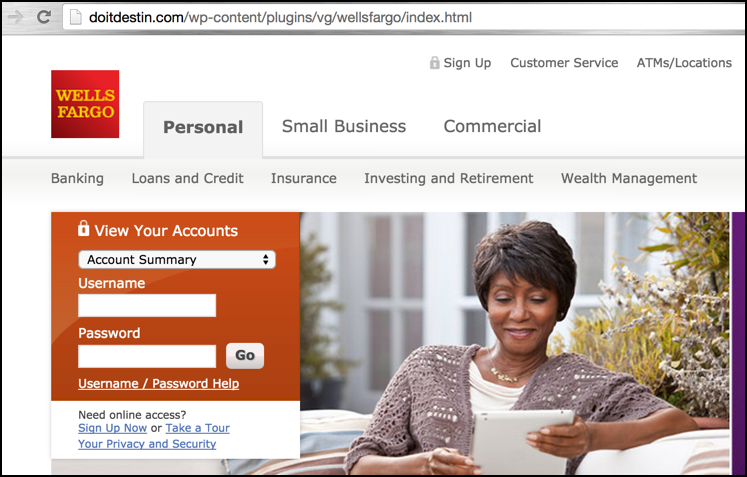
A close examination of the URL shows that doitdestin.com/wp-content/plugins/vg/wellsfargo/index.html is the current URL, which is a long, long way from the real Wells site. Oh, and no secure connection either, another red flag.
But let’s say that you were suckered and did enter your username and password. What would you see next?
This screen:
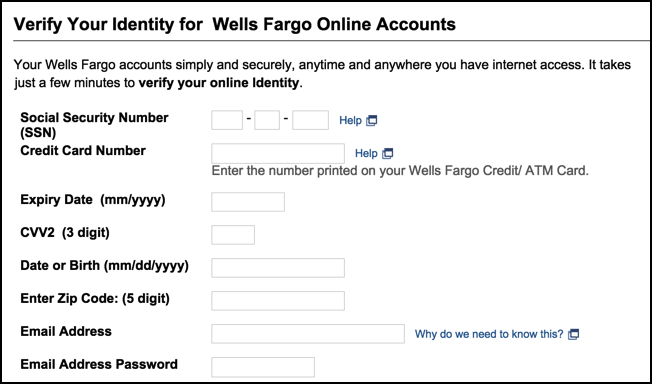
Now you can see just what’s so incredibly dangerous with these attacks. Not only would they ostensibly be able to harvest your account credentials for Wells Fargo Bank — which they could then use to log in to your account and transfer your entire balance to their own accounts — but if you were completely taken in by the scam, they’d also get your SSN, a credit card number, you birthdate and a lot of other information that you really, really don’t want bad guys knowing.
This is why I keep saying the same thing to y’all: vigilance. Skepticism and vigilance. Be careful out there!
If you’re curious how I navigated the phishing site, just remember that since the criminals don’t actually have access to your account information, you can always use credentials like an account name of “not” and a password of “likely” to pass right on through the system. It’s not a valid account name or password, but that’s not really your problem, is it?
Dave, I recently got a similar attack, but without all the tedious clicking around. It appears to be a DNS hijack, but I can’t confirm. By simply going to the WellsFargo.com site an entering ANY login information, when you hit “Go” a popup screen appears asking for all the personal information that you were asked for (and more).
I’ve run 6 different antivirus and malware scans and nothing has come up. This one is very insidious because it doesn’t modify the URL. I can still see it as https://www.wellsfargo.com.
Have you seen this one yet?
Haven’t seen that attack, “Name”, but glad you’re vigilant and haven’t filled in the data. Wondering if it’s as simple as your DNS records being modified? Call Wells Fargo security (the local branch can give you their 800 number) and ask them to help you fix it. And do come back to let us know what’s going on…
Thanks, Dave. Seems to only be affecting Firefox right now as I can get normal login screens with other browsers. When I mentioned this to Wells Fargo security, they recommended that I, “contact my computer manufacturer since it’s not on our side.” When I tried to remind them that this has been out for several years and surely they had seen it before and all I wanted was recommendations to fix it, they then recommended that I talk to my “software provider”. Useless information. I’ll try again at different times of the day to see if I can get someone who understands the problem and not just reading from a checklist.
Hi Dave, this was a tricky one. I ended up having to uninstall Firefox, then do a “clean uninstall” according to these pages:
https://support.mozilla.org/en-US/kb/uninstall-firefox-from-your-computer, and
http://kb.mozillazine.org/Uninstalling_Firefox
This didn’t quite seem to do it since I saw the bogus login screen the next time I installed Firefox. So I repeated the steps above and then went into the Windows Registry with regedit and deleted every occurrence of “Firefox” that I could find.
A cleanup with CCleaner, a reboot, and a fresh reinstall of Firefox and it seems to have fixed it. Whew!
Interestingly none of my antivirus, malware, or spyware scanners picked anything up.
I also ran a check on the FBI website for the DNS Changer virus:
https://forms.fbi.gov/check-to-see-if-your-computer-is-using-rogue-DNS
I hope this helps someone else that sees this. I still don’t know what the source of this attack was or how I would have gotten it. Firefox is my primary browser, so I assume somewhere in my internet travels I may have clicked on something dodgy that installed some code into my Firefox installation.
Thanks